dB vs dBFS Explained: Units, Conversions and Clipping
Why can a mix look safe on one meter and still cause problems at export? Start with the reference behind each number. A dB value compares one level with another, while dBFS places a digital level against 0 dBFS. In fixed-point audio, a valid sample reading is 0 dBFS or below; floating-point processing inside a DAW can temporarily exceed full scale.
Use those definitions as a delivery checklist: identify the reference, convert levels only to a matching scale, then compare the channel meter, loudness meter, and exported file before deciding which reading matters.
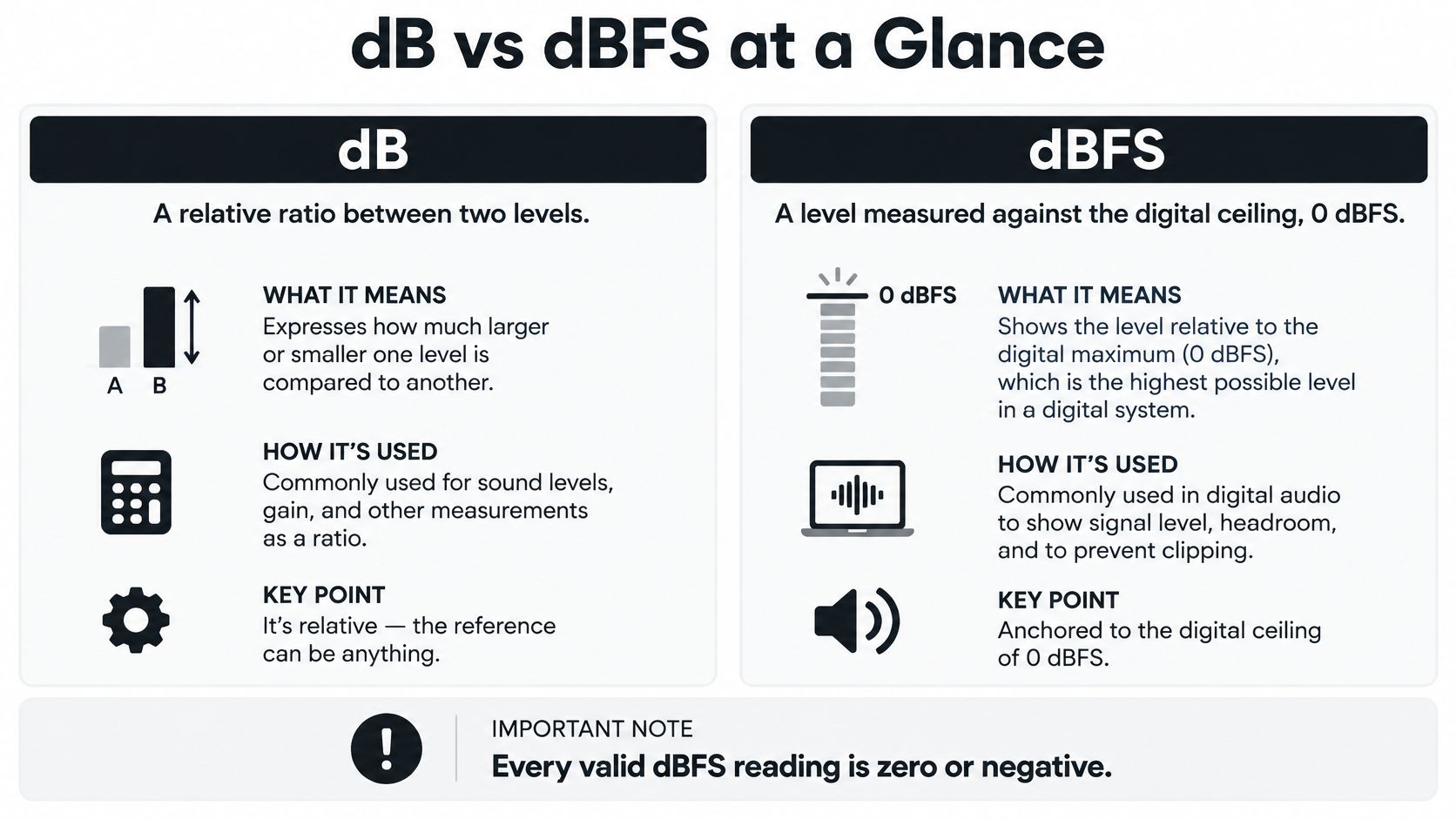
dB vs dBFS at a Glance
dB describes a relationship; dBFS supplies a particular reference. A gain adjustment tells you how much a signal changes. A digital level reading tells you where that signal sits relative to full scale.
dB vs dBFS side by side
| Criterion | dB (relative) | dBFS (decibels full scale) |
|---|---|---|
| What it compares | Two levels, expressed as a ratio | A level against the digital maximum |
| Reference point | Whatever is named, such as the voltage reference for dBu or pressure reference for dB SPL | Full scale, the digital storage ceiling |
| Typical values | Positive, negative, or zero | Zero at most, negative below the ceiling |
| Where you see it | Mixer specs, mic sensitivity, gain staging, SPL meters | DAW meters, audio files, converters |
| Absolute or relative | Relative unless a reference is named | Fixed relative to the system ceiling |
| Example | A gain increase roughly doubling voltage | A sample amplitude roughly half of full scale |
The visual distinction is straightforward: one scale describes a comparison, while the other fixes the comparison point.
Read the label before the number
Say you raise a vocal fader. Its dB label describes gain relative to the signal entering that control. The channel meter reports the resulting signal level, which also depends on the recording, earlier processing, and the meter's position in the signal path.
A fader at unity gain leaves the incoming level unchanged. It doesn't mean the audio has reached full scale, and it certainly doesn't mean silence.
Practical rule: A control tells you what you're doing to the signal. A meter tells you what the signal is doing at a particular point.
A bare dB number needs context. It can be complete when describing a change, such as reducing a vocal's gain, but it's incomplete as a standalone signal level unless someone identifies the reference.
That's why suffixes matter. dBu and dBV identify electrical references, dB SPL identifies an acoustic pressure reference, and dBFS identifies digital full scale. Their shared logarithmic mathematics doesn't make their readings interchangeable.
How Each Decibel Scale Sets Its Reference Point
Decibel calculations turn ratios into manageable numbers. For amplitude quantities, including voltage and sound pressure, use:
Level difference in dB = 20 × log₁₀(measured amplitude ÷ reference amplitude)
For power, use:
Level difference in dB = 10 × log₁₀(measured power ÷ reference power)
These are calculation rules, not loudness predictions. Doubling an electrical amplitude and doubling electrical power aren't the same operation, and neither automatically means a listener hears something as twice as loud.
Electrical and acoustic references
dBu expresses electrical voltage relative to its defined RMS voltage reference. The reference isn't a clipping threshold, and the scale doesn't require a particular load impedance. An analog device can operate above its reference level while remaining clean.
dBV also expresses voltage, but it uses a different voltage reference. You can't compare a dBu specification with a dBV specification by looking only at the printed numbers. First translate both into the same scale or into volts.
dB SPL describes sound pressure in the air. A sound-level meter measures the acoustic result at its microphone, not the level inside your DAW. Speaker sensitivity, amplifier gain, distance, room reflections, and playback settings all affect that result.
If your concern is hearing safety rather than file headroom, you need acoustic measurements and exposure context. Z Audiology's tool can help you compare noise exposure risks, which is a different task from checking a digital recording for clipping.
Digital full scale is a different reference
A dBFS reading compares digital amplitude with full scale. It doesn't tell you the analog voltage leaving an interface or the sound pressure reaching your ears.
There's also an important qualification to the opening rule: fixed-point sample values have a ceiling, but floating-point processing inside a DAW can temporarily represent signals above nominal full scale. That internal capacity doesn't guarantee that a converter, fixed-point export, or downstream processor can accept the signal without overload.
An analog reference is an operating landmark. Digital full scale is an output boundary you must respect when the signal reaches a constrained format or device.
Bit depth concerns the available quantization resolution and theoretical noise performance. It doesn't change the meaning of full scale, and selecting a higher bit depth won't repair clipping already recorded at the input.
The useful question is therefore specific: are you checking voltage, acoustic pressure, digital amplitude, or a change in gain? Identify that first, then choose the scale.
Converting dB and dBFS Levels With Worked Examples
There's no universal conversion from dBFS to dBu. You can convert a digital level into an amplitude ratio directly, but converting it into an analog voltage level requires the interface's calibration.
Convert digital level into amplitude
Use this relationship:
Amplitude relative to full scale = 10^(dBFS ÷ 20)
To reverse it:
dBFS = 20 × log₁₀(amplitude relative to full scale)
For a calculated example, enter −6 into the first formula and you get approximately 0.501. That's roughly half the full-scale sample amplitude, not half the perceived loudness.
The inverse calculation is just as useful. If a normalized sample amplitude is 0.25, the second formula produces approximately −12.04 dBFS. Use the magnitude of the sample for this calculation; a waveform's negative polarity isn't a negative loudness.
Add an explicitly defined calibration
For the worked example below, assume a hypothetical interface is calibrated so that −18 dBFS corresponds to +4 dBu. This is an illustration, not a specification you should assume for your equipment.
Under that assumption, the offset is 22 dB, so the calculated analog equivalent is the digital reading plus that offset.
dBFS levels mapped to linear amplitude and analog equivalents
| Digital level (dBFS) | Analog equivalent (dBu) |
|---|---|
| 0 dBFS | +22 dBu |
| −1 dBFS | +21 dBu |
| −6 dBFS | +16 dBu |
| −12 dBFS | +10 dBu |
| −18 dBFS | +4 dBu |
| −20 dBFS | +2 dBu |
These are calculated results for the stated hypothetical calibration. They aren't universal converter specifications or recommended recording targets.
Read the table as a translation: find the digital reading, then apply the interface's defined relationship. The table doesn't establish whether the analog circuitry remains clean at every listed level.
For a contrasting hypothetical setup, suppose another interface aligns −20 dBFS with +4 dBu. The same analog input would then produce a different digital reading, even though the incoming voltage hadn't changed.
Before converting: Confirm the reference level, input sensitivity, and output calibration in the device manual. A correct formula with the wrong reference still gives the wrong answer.
A calibration tone can help verify the signal path, but compare like with like. An RMS operating-level specification and a sample-peak meter aren't automatically equivalent measurements, especially with changing program material.
Also distinguish an interface's input calibration from its output calibration. Adjustable output trims, monitor controls, and selectable input ranges can change the relationship. Write down the actual configuration before comparing recordings made through different systems.
How to Check Peaks After Stem Separation Without Hidden Clipping
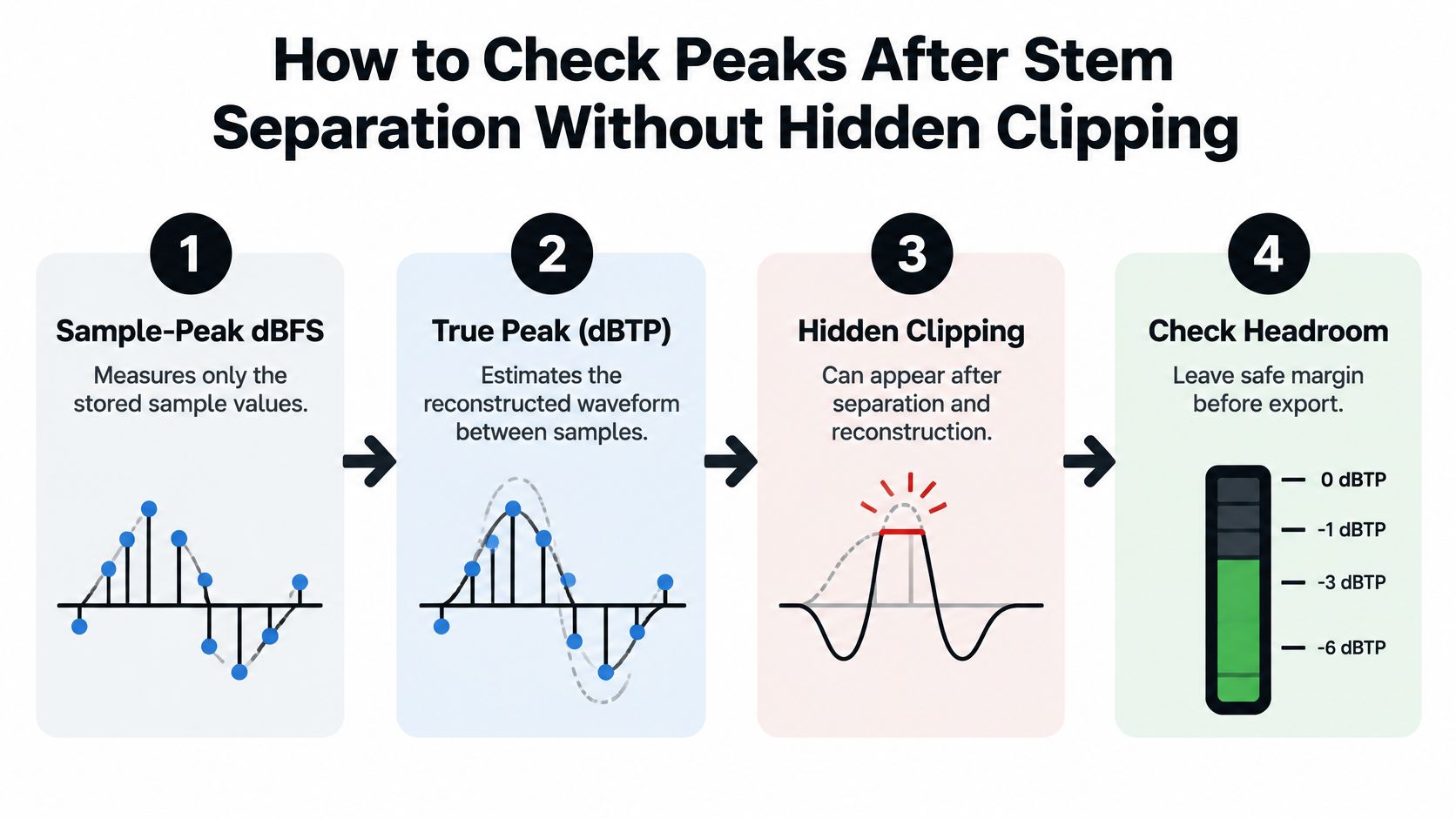
Sample-peak dBFS measures stored sample values, while dBTP estimates the reconstructed waveform between samples, revealing peaks that a sample meter can miss.
In the example described by Forasoft's true-peak guide, a dense mix peaking at −0.3 dBFS can reach approximately +0.4 dBTP or more after reconstruction. That explains how apparently safe sample values can still create a playback or conversion problem.
Use this metering sequence to separate the stored-sample check from the reconstructed-waveform check.
Measure the stem and the complete signal path
Separate and audition the target. Isolate Audio is one option for extracting a described sound and producing both the isolated element and the remainder. Listen for overlapping-source bleed before processing, because unwanted material can contribute to the measured peaks.
Check the stem's sample peak. Import it into your DAW, reset the peak hold, and play the complete selection. Confirm whether you're reading before or after the channel's effects and fader.
Measure true peak. Insert a true-peak meter, such as Youlean Loudness Meter, after processing. Enable its true-peak mode rather than assuming the ordinary channel meter estimates reconstruction.
Test the recombined result. Route the stem and remainder through the intended mix bus. Measure that bus with the actual gains, panning, EQ, and dynamics processing you plan to deliver.
Export lossless when available. Keep a lossless working master so repeated lossy encoding doesn't become part of your editing workflow. If delivery requires a compressed format, check that encoded version too.
Re-measure after final changes. Normalization, limiting, resampling, and format conversion can alter the result. Meter the exported file, not just the session that produced it.
Distinguish prevention from repair
Lowering gain can prevent a later overload, but it won't necessarily remove distortion already embedded in the waveform. If the stem sounds gritty after attenuation, use this guide to removing distortion from audio to distinguish damaged audio from a playback-chain problem.
The digital file is only part of that chain. If an external amplifier overloads despite a clean export, Audio Jam Inc.’s explanation of how to use an oscilloscope to set gain addresses the hardware adjustment rather than the file meter.
For a visual companion to the peak-checking workflow, use the video below.
Choose the final true-peak ceiling from the delivery specification, not from a generic sample-peak recommendation. Leave additional margin when the destination will transcode, normalize, or recombine the audio, and test the expected delivery path whenever you can.
Why dBFS Cannot Tell You How Loud Something Feels
A higher peak reading doesn't necessarily mean a louder listening experience. A brief click can reach a high sample peak yet sound less loud overall than sustained speech.
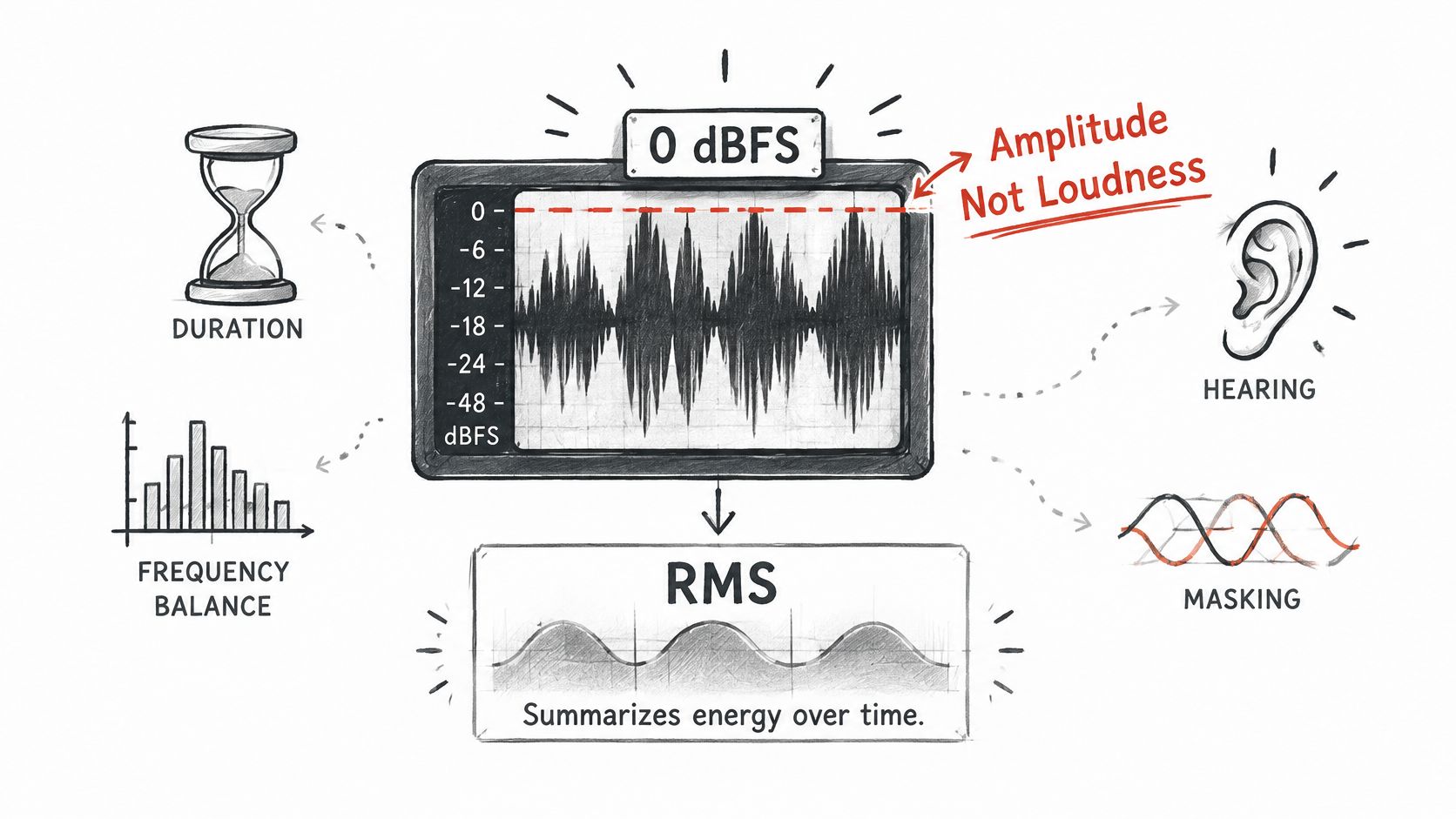
The Monk Audio Lab comparison of peak, RMS, LUFS, and true peak distinguishes digital amplitude from perceived loudness and explains why duration, frequency balance, masking, and human hearing matter. That distinction becomes especially useful when comparing an original mix with an isolated output.
The diagram separates the signal measurement from the listener's experience.
Match the measurement to the question
RMS summarizes signal energy over time. It helps you examine average signal level, but it doesn't apply the same perceptual weighting as a loudness meter.
LUFS is designed to better approximate perceived program loudness. Integrated LUFS describes the complete measured program, while short-term and momentary readings help you inspect changes within it.
Which level metric answers which question
| Metric | What it measures | Use it for | Blind spot |
|---|---|---|---|
| Sample peak (dBFS) | Highest stored sample value | Clipping at file level | Misses inter-sample peaks |
| True peak (dBTP) | Estimated reconstructed peak between samples | Delivery ceilings and codec headroom | Does not show loudness |
| RMS (dB) | Average energy over time | Gain staging and comparing signal levels | Ignores human loudness weighting |
| Integrated LUFS | Estimated perceived loudness of a whole file | Comparing mixes and streaming normalization | Needs the full program to measure |
RMS readouts also need a defined reference and meter convention. Don't assume every plug-in's RMS display uses an identical calibration.
Compare isolated audio fairly
Say you remove the accompaniment from a vocal recording. The vocal may become easier to hear without any increase in its sample amplitude because the instruments no longer mask it.
That doesn't guarantee the isolated file will produce a higher integrated loudness reading. You've also removed energy from the original mix, so the meter and your impression of vocal prominence can move in different directions.
Use a comparison protocol with separate purposes:
- For integrity: Check sample peak and true peak on each finished file.
- For loudness: Measure equivalent passages or complete programs consistently in LUFS.
- For quality: Listen for bleed, missing consonants, warbling, and changes in the target sound.
For material with strong contrasts between quiet and loud passages, understanding audio dynamic range helps you interpret why a whole-file average doesn't describe every moment. Loudness-normalized playback can also reduce the apparent advantage of pushing peaks higher, so judge intelligibility and tone rather than chasing the tallest meter reading.
Common dB and dBFS Confusions and How to Fix Them
A file that looks safely below full scale but distorts on playback needs a true-peak check, not an argument about whether the meter is broken. Start with the symptom, then choose the measurement that can diagnose it.
Common dB and dBFS confusions, causes and fixes
| Confusion or symptom | Why it happens | Fix |
|---|---|---|
| File below full scale distorts on playback | Inter-sample peaks can appear after reconstruction or encoding | Measure dBTP and leave true-peak headroom |
| Isolated vocal sounds louder, dBFS unchanged | Removing accompaniment reduces masking | Compare LUFS and listen for masking |
| Click reads higher than speech | Peak level doesn't match perceived loudness | Check RMS or LUFS alongside the peak |
| Two peak-normalized files still differ | Peak normalization ignores program loudness | Normalize to a loudness target instead |
| Analog line signal looks quiet on the DAW meter | The converter maps operating level below digital full scale | Confirm the reference level in the device manual |
| Stems are safe but the sum clips | Combining signals can increase the resulting peak | Measure true peak on the summed mix |
| A bare dB value has no reference | The measurement context is missing | Name the reference before comparing levels |
Peak matching isn't loudness matching
Peak normalization changes gain until the highest peak reaches a chosen target. It doesn't account for how much sustained sound surrounds that peak.
For a fair listening comparison, normalize both files to the same integrated LUFS target, check that the resulting peaks remain acceptable, and audition them at an unchanged monitor setting. Don't add heavy limiting just to force a comparison if that processing changes the sound you're trying to evaluate.
A comparison is useful only when the measurement method and playback conditions stay consistent.
An unnamed reference prevents a useful conversion
If a specification says only dB, ask whether it describes gain, signal-to-noise ratio, voltage level, acoustic pressure, or digital amplitude. A ratio specification may already contain its comparison in the label, such as input-to-output gain.
A standalone level needs more information. Name dBu, dBV, dB SPL, or dBFS before attempting to compare it with another reading, and check whether the meter reports peak or average behavior.
Choose the Right Unit Before You Export
Choose meters by the job you're doing, not by which display looks most active. Keep a simple metering chain available in your DAW so you can repeat the same checks without rebuilding the session.
Make the decision by task
- Recording: Use the input's dBFS meter to set gain with room for unexpected performance peaks. Match external equipment using the interface's documented calibration, not the apparent height of the waveform.
- Mixing: Loudness-match your reference track before judging tonal balance and dynamics. Use RMS or integrated LUFS for level context, then evaluate final output peaks separately.
- Delivering isolated stems: Check the processed stem and the actual recombined mix. Audition transitions where the isolated sound enters or leaves, since artifacts may be more obvious there.
- Cleaning video dialogue: Measure loudness against the destination's delivery requirement and inspect the completed export. Listen for intelligibility through background music, not just during solo playback.
Export format deserves its own decision. This explanation of audio bit depth can help you choose an appropriate working and delivery format without confusing resolution with level.
For paid social video, audio checks belong alongside placement and presentation checks. You can find LinkedIn video ad placement tips in ContentBuck's guide while confirming the destination's current delivery requirements.
Run the final delivery check
- Name the unit: Identify exactly what each meter displays.
- State the reference: Confirm the calibration whenever digital and analog equipment connect.
- Measure the final export: Check true peak after the last processing and conversion stage.
- Listen before delivery: Audition the isolated sound, its context, and the finished file.
Don't approve an export from its waveform picture alone. Name the unit, state the reference, measure the true peak, then listen before delivery.
Isolate Audio lets you describe a target sound in plain English and separate it from the rest of an audio or video recording. Visit Isolate Audio to create an isolated element and remainder, then use the peak and loudness checks above before adding them to your project.