What Is Recording and How Modern Audio Capture Works
You've probably done this already today. You tapped record on a phone to save an idea, captured a meeting so you wouldn't miss details, or filmed a clip and trusted the camera mic to “get the sound.” Then later you looked at the file and thought: is the recording the moment that happened, or the thing now sitting in my folder?
That confusion is normal. People use recording to mean at least two different things at once, and the gap matters more now than it used to. Modern creators don't just capture sound and move on. They trim it, clean it, isolate parts of it, reuse it in new projects, and archive it for later.
What Recording Really Means Today
A simple way to understand recording is to compare it to photography.
When you press a camera shutter, one thing happens in real time. Light hits the sensor. That's the act of capturing. But after that moment, you also have the photo itself. It's a saved object you can rename, edit, share, print, or store away. Recording works the same way.
With audio, recording is both a live process and a stored artifact. During the process, a microphone or another sensor captures a changing event. Afterward, you're left with something fixed, such as a WAV file, an MP3, a voice memo, a tape, or a video clip with embedded sound.
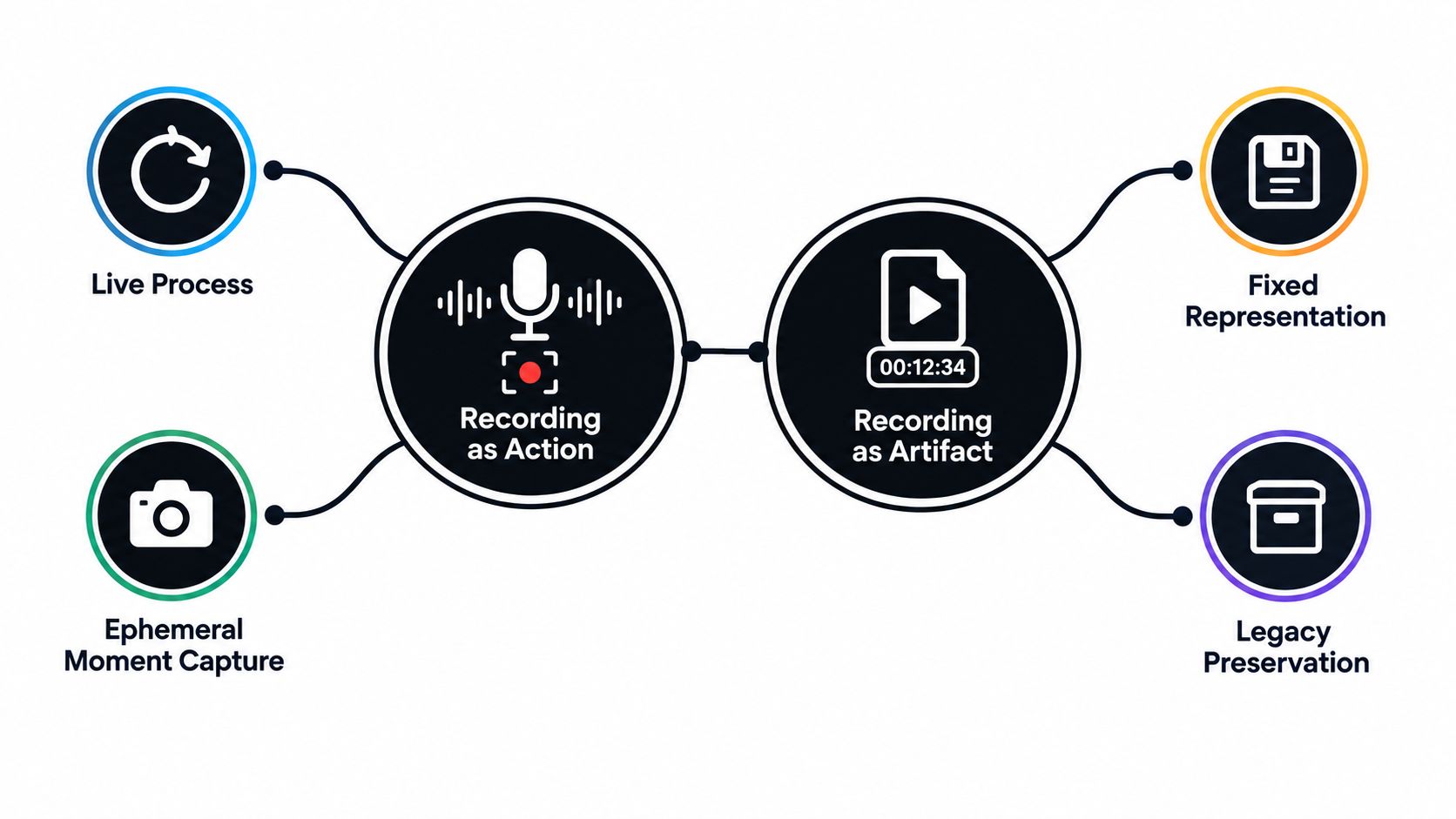
Why the word causes confusion
The word gets slippery because people switch meanings without noticing.
A musician might say, “We're recording tonight,” meaning the live act of capture. A producer might say, “Send me the recording,” meaning the finished file. A teacher might ask a student to make a recording of a reading passage. A lawyer or archivist may treat a recording as an object with ownership, permissions, and retention rules.
Cambridge reflects this split by defining recording as both the process of storing sounds or moving pictures and the thing that is stored, which is exactly why the phrase what is recording often needs more than a dictionary answer (Cambridge recording definition).
Why this matters in digital work
That process-versus-artifact distinction isn't just academic. It changes how you make decisions.
If you only think of recording as “capturing sound,” you might stop caring once the take is over. But if you think of a recording as a reusable asset, your priorities shift. You start asking better questions:
- Can I edit this later? A clean master file gives you options.
- Can I isolate one element? Voice, crowd noise, guitar, room tone, or a specific sound effect may all matter later.
- Can I repurpose it? One interview might become a podcast, a video voiceover, a transcript, and short clips.
- Can I preserve it? Recordings often outlive the original moment.
A recording starts as an event and ends as material you can work with.
That second half matters because digital workflows are built around separation, revision, duplication, and reuse. The file isn't just a memory of what happened. It becomes raw material for the next step.
How Sound Becomes a Recording
Sound feels invisible, which is why recording can seem mysterious. It helps to picture it as a chain of handoffs. One form of energy turns into another, then another, until it becomes a file your computer can store.
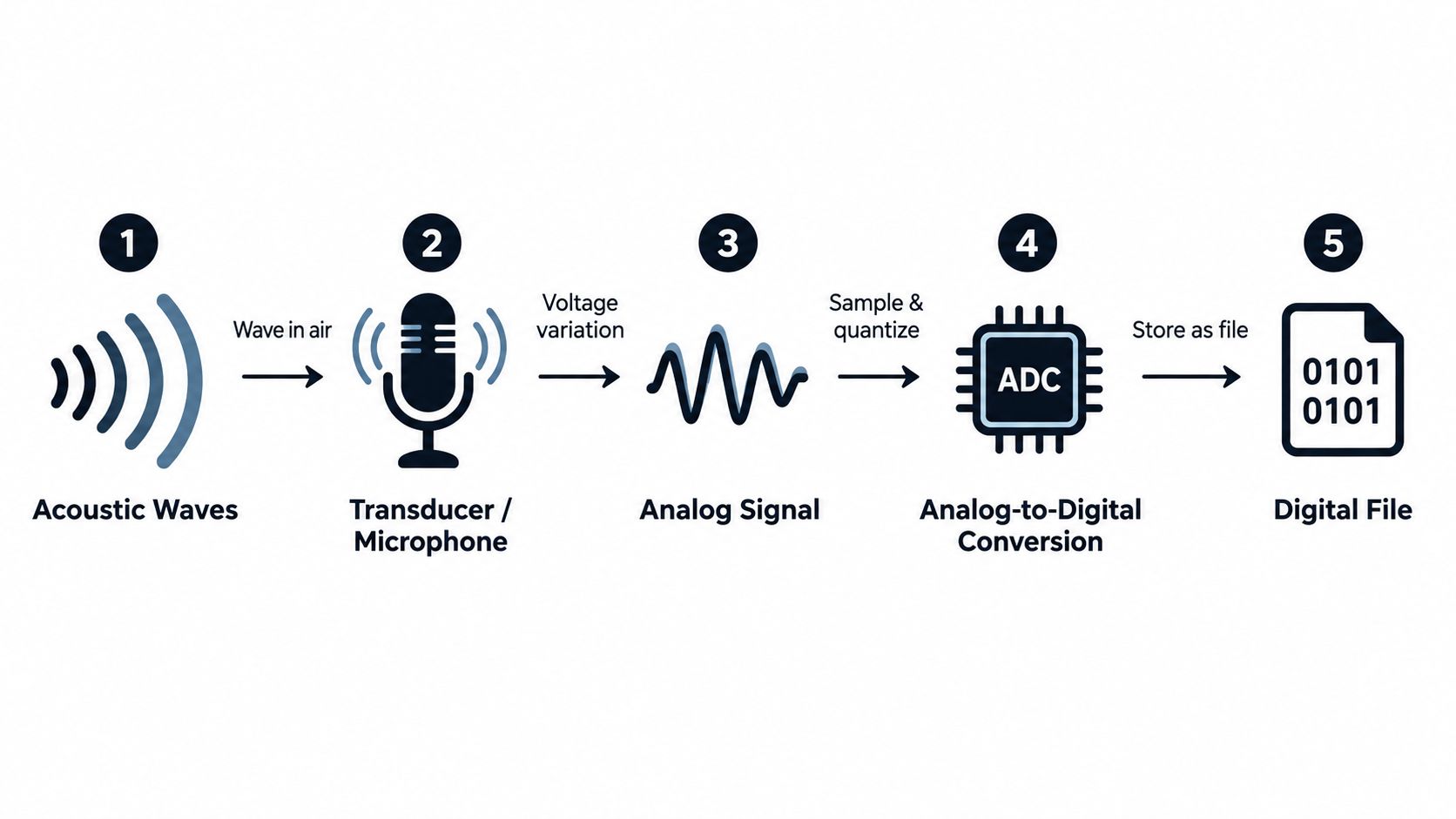
Step one through step three
Start with a person speaking.
Their vocal cords create vibrations. Those vibrations travel through air as acoustic waves. If someone claps, sings, or drops keys on a table, the same basic thing happens. Air pressure changes move outward and reach the microphone.
The microphone acts like a translator. It turns those pressure changes into an electrical signal. That signal is still shaped like the sound, but now it exists as changing voltage instead of moving air.
Then a preamp boosts that tiny signal to a more usable level. Gain comes into play here. Too little gain, and the recording may be weak and noisy. Too much, and loud moments can distort.
Practical rule: Good recording level is a balance. You want a healthy signal, not a signal pressed so hard that loud peaks break apart.
Step four through storage
Once the signal is strong enough, an analog-to-digital converter measures it and translates it into numbers. Those numbers become the digital representation of the original sound.
This is the point where the recording changes from a flowing electrical event into data your device can save. Your recorder, interface, camera, or phone writes that data into a format such as WAV, M4A, or MP3.
Here's the chain in plain language:
- Sound happens in the air
- A microphone senses it
- The device creates an electrical version
- The converter turns that into digital data
- The system stores it as a file
Later, playback reverses the idea. Speakers turn stored electrical instructions back into sound waves in the room.
For a practical example, many beginners benefit from a device-specific walkthrough before they worry about signal flow. If you're recording on Apple hardware, this AIDictation recorder setup explains the basic steps for capturing voice on a MacBook Air.
A short visual demo helps make the chain feel less abstract:
Why each stage affects quality
Beginners often blame “the mic” for every problem. Sometimes the mic is the issue, but often the trouble starts earlier or later in the chain.
- Room noise gets captured before the signal even reaches the mic.
- Mic placement changes tone, clarity, and plosives.
- Gain setting affects noise and distortion.
- Conversion and file settings affect what gets preserved for editing.
If you understand the chain, you can troubleshoot with much more confidence. Instead of saying “my recording sounds bad,” you can ask where the problem entered the chain.
Analog and Digital Recording Compared
People often talk about analog and digital as if one is “real” and the other is “fake.” That's not a useful way to think about it. Both are methods of storing sound. They just store it differently.
Analog recording stores a continuously changing representation of sound. Tape does this magnetically. Vinyl stores groove changes that correspond to the waveform. The signal remains continuous throughout the storage method.
Digital recording stores measurements of sound as numbers. Those measurements are taken over time, then written into a file a computer can copy, edit, and transmit.
The practical difference
For everyday creators, the biggest differences aren't philosophical. They're workflow differences.
Analog often brings character, mechanical limits, and a physical medium. Digital brings convenience, repeatability, and easier editing. If you duplicate an analog tape repeatedly, each generation can change. If you copy a digital file correctly, the copy remains the same as the original file.
That's one reason digital workflows dominate so much of current media production. The article's keyword question, what is recording, now usually points to a digital process that leads to a portable file rather than a single fixed physical object.
Analog vs Digital Recording at a Glance
| Feature | Analog Recording | Digital Recording |
|---|---|---|
| How sound is stored | Continuous physical or electrical representation | Numerical data stored as a file |
| Common media | Tape, vinyl, other physical formats | WAV, FLAC, MP3, M4A, video files |
| Editing | Often slower and more manual | Faster, non-destructive in many apps |
| Copying | Can change across generations | Can remain identical when copied correctly |
| Noise behavior | Often includes medium noise and mechanical artifacts | Usually cleaner, though poor capture still causes problems |
| Portability | Depends on physical medium and playback device | Easy to store, transfer, and back up |
| Creative appeal | Texture, ritual, physical workflow | Flexibility, speed, recall, reuse |
Which one should you care about
Most readers asking what recording is are working digitally, even if they admire analog gear.
That doesn't mean analog has no place. Tape, cassette, and vinyl still attract musicians and engineers who want a certain sound or process. But if your goal is podcast production, dialogue capture, field recording, online video, or file-based music production, you're almost always dealing with digital recording choices.
Analog is often chosen for flavor. Digital is usually chosen for control.
That's why understanding digital settings matters more than winning an analog-versus-digital debate.
Understanding Bit Depth Sample Rate and File Formats
Many people get lost, mostly because audio settings get explained with too much math and too little context. You don't need an engineering background. You just need to know what each setting changes.
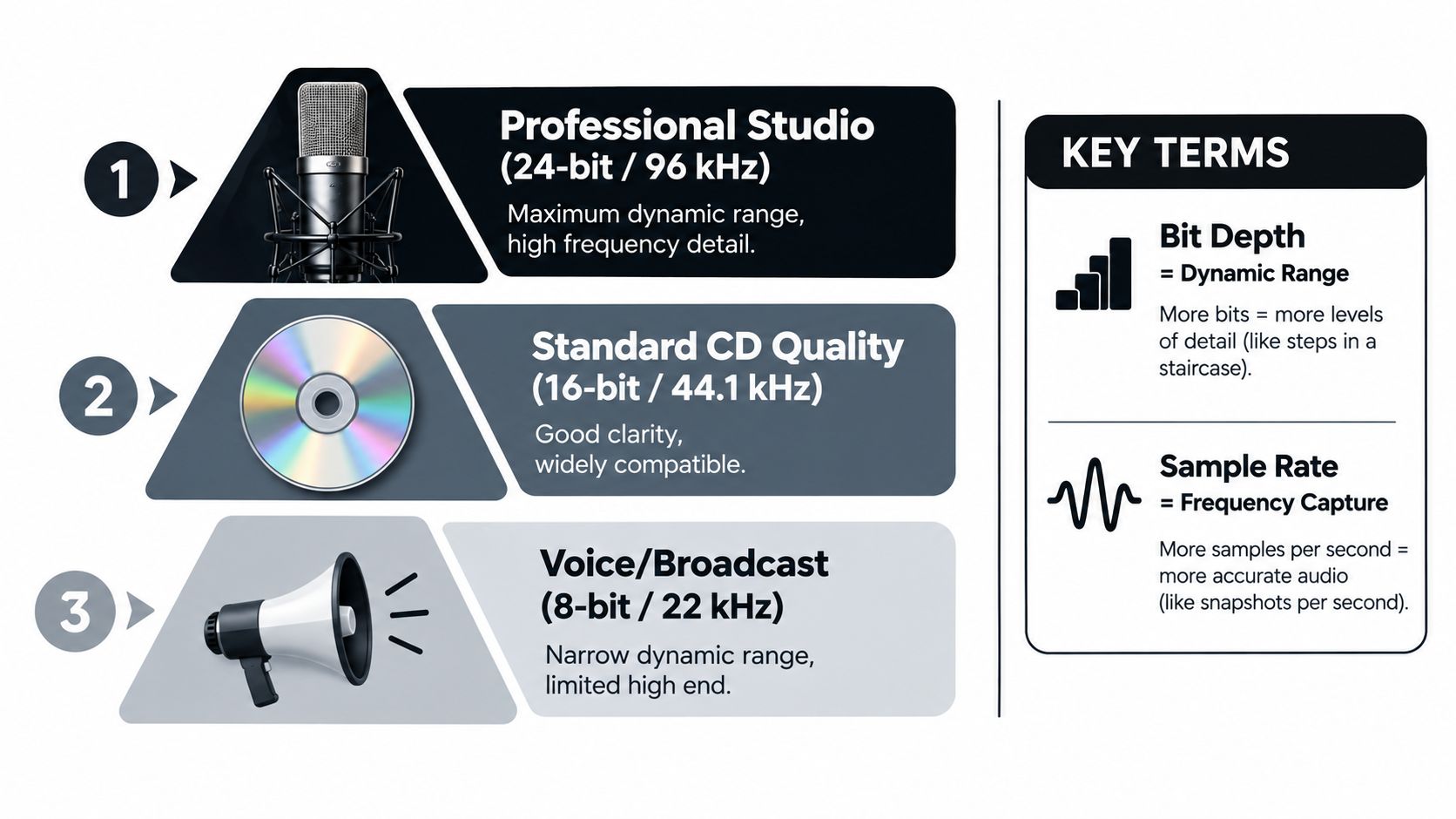
Bit depth controls dynamic range
Bit depth affects dynamic range, not frequency response.
According to the Audacity manual on digital audio, each added bit contributes about 6 dB of theoretical dynamic range. That means 16-bit audio provides roughly 96 dB, while 24-bit audio provides roughly 144 dB.
In practice, this matters because 24-bit capture gives you more headroom. You can record with conservative input levels and still preserve low-level detail better than you could with a shallower bit depth. That's useful for speech, vocals, interviews, and live sources that may jump in level without warning.
Think of bit depth like the smoothness of steps in a staircase. More available steps let the system represent level changes more gracefully.
If you want a separate plain-language walkthrough of this one setting, this audio bit depth article is a helpful companion.
Sample rate controls how often sound is measured
Sample rate tells you how many times per second the waveform is measured.
A sample rate and bit depth explainer notes that a 48 kHz recording captures 48,000 samples per second, implying a Nyquist limit of 24 kHz. In plain English, that means 48 kHz is already enough to represent full-bandwidth audio for most human hearing. Higher sample rates mainly create more room for anti-aliasing filter design and post-production work rather than revealing entirely new audible content.
A camera example helps here. Sample rate is a little like how often a system takes snapshots of a moving shape. More snapshots can help in some workflows, but beyond a point, you're not gaining much obvious benefit for normal listening.
File format decides how the recording is stored
After capture settings, you still need a file format. People mix up quality and container.
Here's the quick version:
- WAV is a common uncompressed format for recording and editing.
- FLAC is lossless. It saves space without discarding audio information.
- MP3 is lossy. It throws away some information to make files smaller.
- M4A often appears in mobile and consumer workflows. Quality depends on the codec inside it.
For recording, a safe habit is to keep a high-quality master, then make smaller delivery versions later if needed.
A practical default
If you just want a sensible starting point, use these ideas:
- Record at 24-bit when possible for easier level management.
- Use 48 kHz for general video, voice, and many modern production tasks.
- Save a lossless master before exporting compressed copies.
Higher numbers don't automatically mean better results. Clean capture beats inflated settings.
A noisy room recorded at ambitious settings is still a noisy room.
Best Practices for Clean and Usable Recordings
A usable recording starts before you press record. Most rescue work later comes from problems that were preventable during capture.
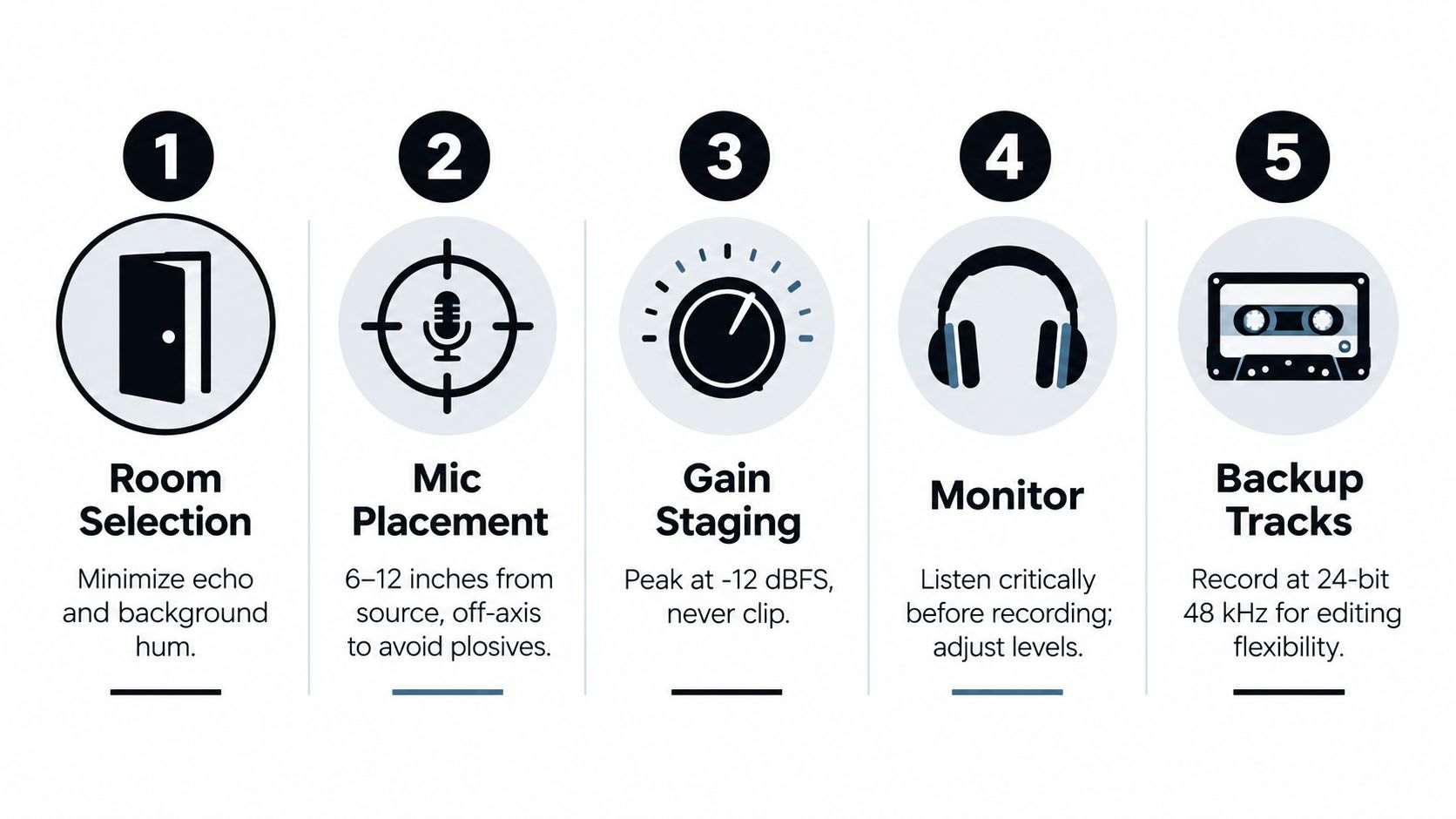
Start with the room, not the gear
A great microphone in a harsh room still records a harsh room.
Choose the quietest space you can control. Turn off fans if possible. Listen for refrigerators, computer fans, traffic wash, HVAC rumble, and reflective surfaces that make speech sound splashy. Softer furnishings often help because they reduce obvious reflections.
If you need a fast browser-based option for simple voice capture, BubblyPhone's voice recording is one example of a lightweight tool for getting words down without a complicated setup.
Position matters more than many beginners expect
Mic placement changes the result immediately.
For voice, keep the microphone reasonably close, but not directly in front of the mouth where plosives hit hardest. Slightly off-axis placement often sounds cleaner. If the source gets farther from the mic, the room becomes a bigger part of the recording.
This matters even more when you expect to edit or isolate later. Cleaner source capture gives you more separation between the sound you want and everything around it.
A short capture checklist
Use this before every take:
- Check the environment: Pause and listen for steady noises you stopped noticing.
- Set conservative levels: Leave headroom so surprise peaks don't clip.
- Monitor on headphones: Don't trust the speaker in the room to tell you what the mic hears.
- Record a test phrase: Speak, sing, or play at real performance level.
- Save a clean master: Keep the original before making edits or compressed exports.
Record for the edit you expect to do later, not just for the moment you're in.
Watch levels and monitor early
The infographic above includes a level target for peaks. That's a practical working guide, not a law of physics. The deeper point is to avoid clipping while keeping your signal strong enough to work with.
Monitoring matters because many problems are obvious only when heard through headphones. Clothing rustle, cable crackle, mouth noise, and room hum can hide in plain sight while you're focused on performance.
If your recording is destined for video publishing, this guide on how to record audio in YouTube contexts can help you think through source capture and later cleanup together.
Types of Recording in Modern Creator Workflows
When people ask what recording is, they often aren't asking for a dictionary definition. They're asking which kind of recording applies to what they're doing.
That question matters because the category has widened. A market summary projects the voice recorder market at $1.09 billion in 2025, the audio recording services market at $21.3 billion in 2025, and reports that recorded music revenues grew 6.4% year on year to $31.7 billion in 2025 (voice recorder market summary). The point isn't just size. It's breadth. Recording now spans far more than studio music sessions.
The word means different things in different workflows
A few examples make this easier:
- Music recording often means multitrack capture, overdubs, edits, and mixing.
- Podcast recording usually means spoken-word clarity, guest management, and cleanup.
- Field recording may focus on environment, wildlife, urban texture, or documentary realism.
- Voice memos prioritize speed and convenience over elaborate setup.
- Video production audio has to work with picture, sync, and often noisy locations.
The same person may move across all five in one week.
One capture can become many assets
Modern recording is fragmented because one source file rarely has just one job.
A single interview might start as a camera recording. Then someone extracts the audio, removes background distractions, pulls a quote for social media, creates a transcript, and archives the raw file for legal or editorial reference. A musician may record a rehearsal, isolate one instrument to study mistakes, then reuse a strong phrase in a later arrangement.
That's why the stored artifact matters as much as the live act. Once captured, the recording enters a workflow.
For creators building spaces specifically for repeatable capture, studio planning can shape the whole chain. This Encore Film And Music Studio guide is a useful example of how people think about environment, production goals, and flexible use of a room.
Why the definition keeps stretching
The earliest true sound recording is generally dated to 1857, when Édouard-Léon Scott de Martinville invented the phonautograph. It traced sound waves visually but couldn't play them back at the time. Those phonautograms were later digitally played in 2008, confirming that sound recording predates Edison by 20 years. The Library of Congress also notes the 1860 recording of “Au Clair de la Lune” as the earliest surviving recorded human voice (Library of Congress recording timeline).
That history shows something important. Recording began as preservation of a fleeting event. Today it still does that, but it also feeds editing, archives, accessibility, remixing, research, and machine-assisted post-production.
Putting Your Recordings to Work
A recording becomes valuable when you can use it again without wishing you had captured it differently.
That's the practical answer to what is recording today. It's a live capture process, and it's also a durable object that can be edited, searched, repurposed, cleaned, separated, archived, and delivered in multiple forms. If you keep those two meanings in mind, your choices during capture get sharper.
Keep masters, make derivatives
One of the safest habits in audio is simple. Keep a high-quality original, then create working copies for specific jobs.
Your master might support several downstream tasks:
- Editing: trimming mistakes, balancing levels, and rearranging sections
- Delivery: exporting smaller files for email, web, or mobile use
- Extraction: pulling audio from a video source for cleanup or reuse
- Isolation: separating a voice, instrument, or background sound for focused work
If your source is embedded in video, this guide on how to get audio from a video is a useful starting point before any repair or separation step.
Think ahead to separation and reuse
Modern workflows really differ from older one-and-done recording habits.
A file that seemed “good enough” for casual listening may become frustrating when you need to isolate dialogue, remove room distractions, or pull one sound from a dense mix. Cleaner originals usually create better options later. That applies whether you're a podcaster salvaging an interview, a filmmaker fixing location sound, or a researcher trying to focus on a specific acoustic event.
One tool in that kind of workflow is Isolate Audio, which lets users upload audio or video files and isolate described sounds from a recording using natural language prompts. That's useful when the goal isn't just to listen back, but to work on one element inside the captured material.
Recording isn't just about saving the past. It's about preparing material for future use.
If you want to turn recordings into editable parts instead of treating them as fixed blobs of sound, Isolate Audio can help. You can upload a recording or video, describe the sound you want in plain English, and separate it from the rest for cleanup, study, remixing, or reuse.