Crowd Cheers for Basketball: How to Isolate Them
You've found the perfect basketball reaction: the basket drops, the crowd erupts, and the commentator talks straight through it. You need the roar for a highlight edit, but cutting out the whole passage would also remove the call, the ball bounce, and the whistle you still need.
Pulling crowd cheers for basketball out of a mixed recording isn't just about getting an exciting sound effect. It's about producing two usable files: a cheer track with the reaction intact and a remainder that preserves everything else. The strongest workflow checks both before committing to a full game.
Recognize Crowd Cheers by Their Sound
A basket drops and the room turns into a dense wash. That wash is a sustained roar: on a spectrogram it spreads across many frequency bands instead of drawing one clean line. The brightest patch is only the peak. The quieter onset and the fade are what give the reaction its shape, and they are what you still need if commentary and court sound have to survive as their own file.
Rhythmic chants differ because repeated syllables make regular pulses. A sudden shout is an abrupt vertical mark. Applause shows up as clustered clicks. Booing often sits heavier in the lower mids, though microphone placement and the mix around it can change that read.
Basketball crowd cheer types and how they look in a recording
| Cheer type | Typical length | Spectrogram appearance | Common game moment |
|---|---|---|---|
| Sustained roar | 4–8 seconds, from swell through fade | Broad, dense energy across many bands, rising then fading | After a made basket or defensive stop |
| Rhythmic chant | 6–12 seconds across the repeated phrase | Repeated pulses at a steady tempo layered over a roar | Timeouts and rivalry moments |
| Short peak or shout | About 0.5–2 seconds, attack plus decay | Sharp vertical transient with fast decay | Buzzer-beater, dunk, block |
| Applause and clapping | 2–5 seconds of overlapping claps | Dense clusters of clicks with broadband transients | Introductions and free throws |
| Booing | 3–8 seconds of sustained vocal reaction | Heavier lower-mid energy with little rhythm | Opponent free throws and calls |
Read texture, not just loudness
Three principal spectral shapes explained 87.5% of total variance across 30 games in an acoustic analysis of collegiate basketball and volleyball games. That work also separated recurring mixtures of crowd, music, individual voices, and public-address audio. Extraction has to follow changing texture, not one fixed frequency band.
Open the recording in a spectrogram-capable editor such as Audacity or Adobe Audition. Listen while you watch the display, then mark the start, the strongest reaction, and the audible tail of each useful event.
A whistle can draw an equally striking line, so the picture alone will mislead you. I will not treat a cheer as ready to pull until three checks still hold in the mix you plan to keep: the call stays intelligible, the ball bounce stays a short transient, and the whistle stays a narrow tone instead of dissolving into the roar. Fail any one of those and the remainder is leftover noise, not a usable bed.
For a reusable effect library, the crowd-cheering sound-effect guide sits beside this recording-first pass. Name each marker in plain English by sound and event, such as "sustained roar after block" or "crowd noise", not "loud crowd".
Practical rule: Mark what you intend to recover before processing. A cleaner-sounding output can hide a missing reaction.
Prioritize Cheers by Game Moment Before You Extract
Start with defensive stops, rebounds, and contested possessions when you need event-specific reactions. Put game-winners and comeback runs alongside them for editorial value, then treat opponent free throws as situational material. Routine possession noise usually belongs in the ambience bed rather than a separate extraction queue.
A peer-reviewed analysis of NBA games examined 1,080 games during the 2020–2021 season and found that rebounding differential statistically mediated the relationship between crowd presence and scoring margin. That makes rebound timing worth preserving for structured analysis, but it doesn't prove those plays always produce the loudest or cleanest cheers.
Extraction priority by game moment
| Game moment | Typical cheer pattern | Extraction priority | Best use |
|---|---|---|---|
| Defensive stop or rebound | Sustained roar that builds | High | Highlight edits and research samples |
| Buzzer-beater or game-winner | Short peak followed by roar | High | Social clips and promos |
| Comeback run | Building roar with chants | High | Narrative edits |
| Opponent free throw | Booing or hushed crowd | Medium | Rivalry sequences |
| Routine possession | Low murmur | Low | Ambience layers only |
Use this ranking as an editorial starting point, not an acoustic guarantee.
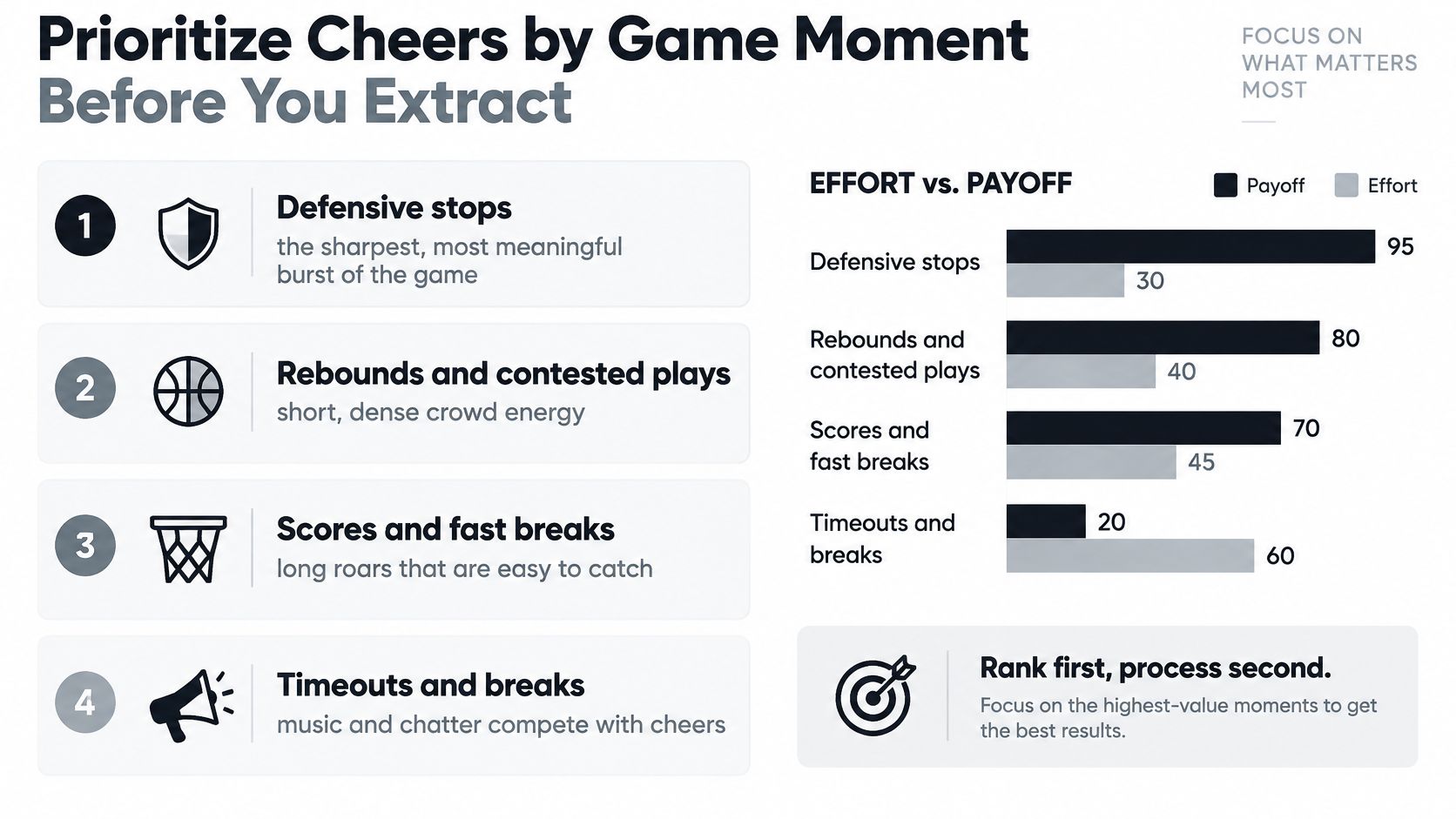
Attach the game moment to every timestamp. For a dataset, keep the play onset separate from the crowd onset so a delayed reaction doesn't become a misleading event label. For an edit, retain enough lead-in to make the swell feel motivated rather than pasted onto the action.
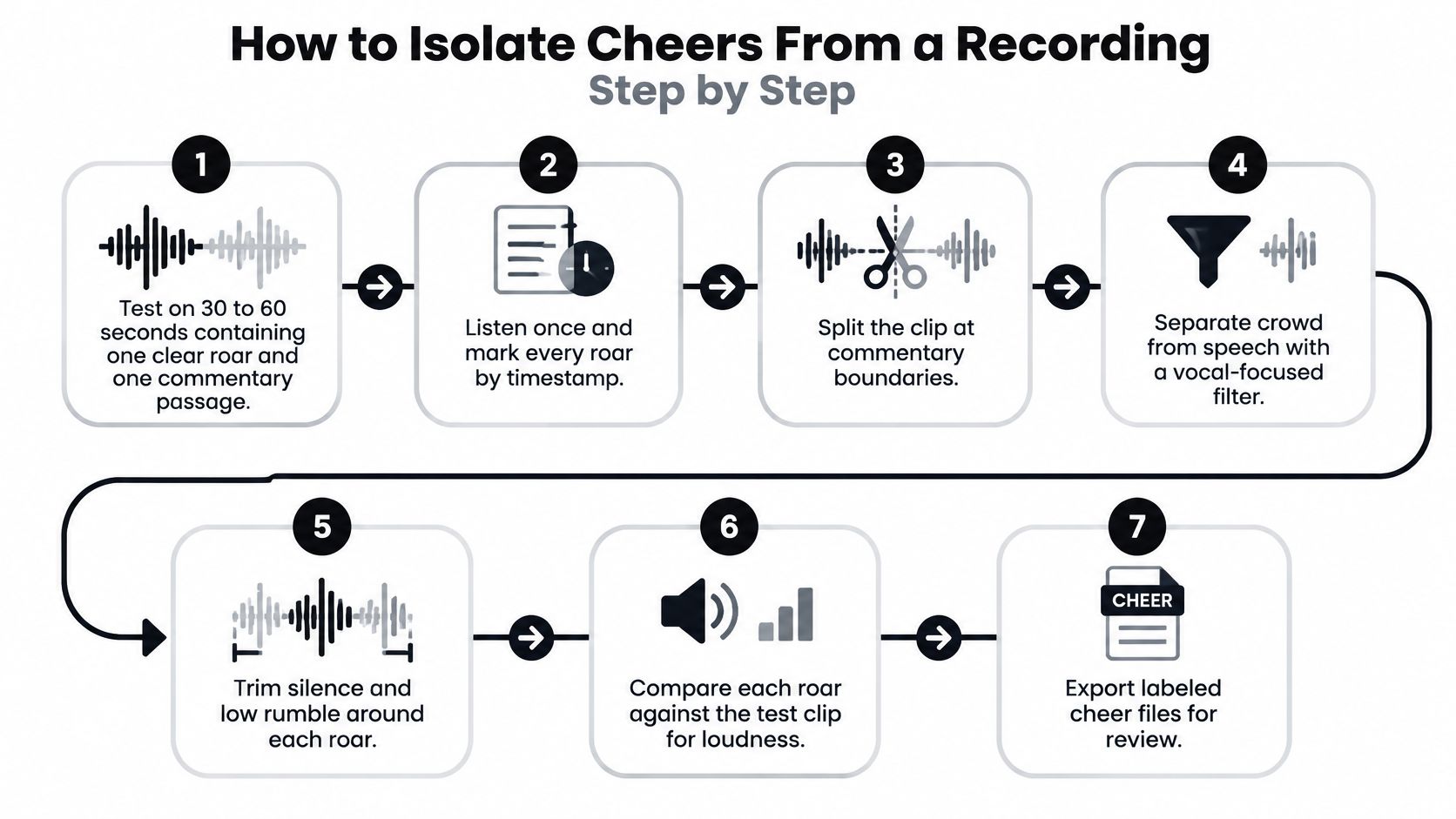
How to Isolate Cheers From a Recording Step by Step
Establish a representative test
Don't begin with an entire game. Choose a short passage that includes a clear reaction, commentary over the crowd, and some quieter court audio. That combination exposes more weaknesses than a clip containing only an unobstructed roar.
Build the test clip. Keep the original recording untouched and work from a copy with its channel layout preserved. Include the reaction's lead-in and tail so the separator has context rather than an abruptly cropped burst.
Upload the recording. Isolate Audio accepts audio and video formats including MP3, WAV, FLAC, M4A, OGG, MP4, and WebM, so supported phone footage doesn't need an intermediate conversion. Avoid making another lossy copy just to change the container.
Listen and mark the target events. Note each useful cheer's timestamp and its game-moment label before running separation. Include quieter reactions you want to keep, not only the loudest waveform peaks.
Describe the target in plain English. Use a description such as crowd cheering or crowd noise; the description tells the separator which sound to isolate rather than which frequency range to retain. Consult the natural-language description examples if you need to distinguish diffuse cheering from a nearby spectator's voice.
Choose processing for the difficulty of the mix. Use Precision Mode for a challenging overlap with commentary or music, and begin with the default approach for an exposed crowd recording. Don't assume that more demanding processing automatically produces a better result.
Run separation and retain both outputs. Save the isolated cheer and the remainder as a paired result. Keep their names connected to the same source clip so you won't accidentally compare outputs from different attempts.
Review before downloading your working files. Play the cheer against your markers, checking the attack, body, and tail, then audition the remainder. Choose the available export format appropriate to your editing workflow and preserve the original for another pass if necessary.
Keep the test reproducible
Write down the description and setting alongside the clip name. If you change both at once, you won't know which adjustment helped, so modify one variable per comparison.
The visual workflow below is a useful review aid, but don't treat vocal filtering as a substitute for target-based separation. A crowd is also made of human voices, so a conventional vocal-focused process may group the announcer and audience together.
Handling Cheers Under Commentary, Music and Crowd Overlap
Commentary overlap is a critical failure case: the extraction may capture an announcer's consonants along with the audience. The isolated cheer can sound impressively full while the remainder loses the intelligibility of the play-by-play call.
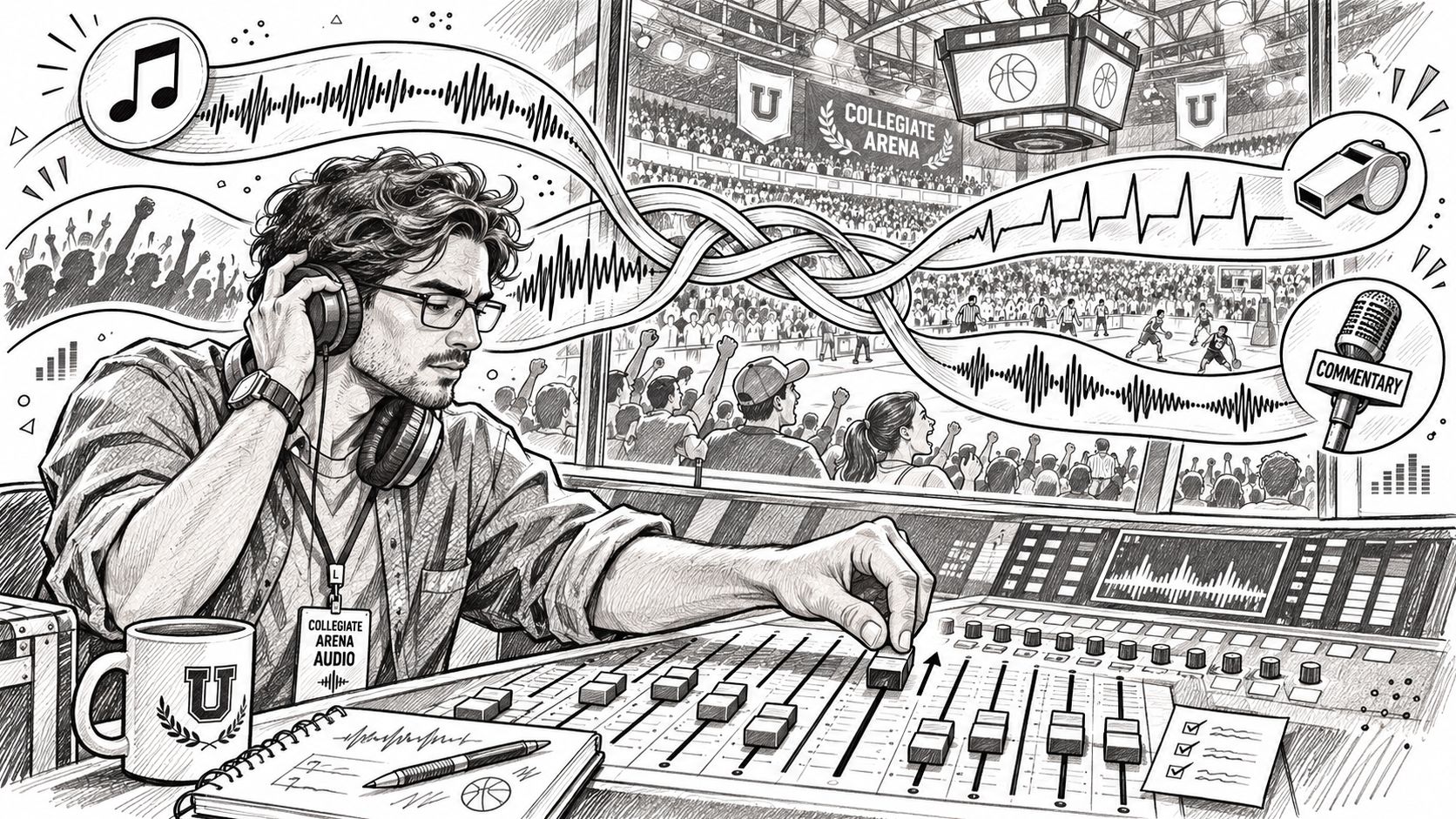
A broadcast mix contains several competing sources, as the control-room setting below illustrates.
Choose the compromise by source
A broad equalizer won't neatly separate a chant from speech when both occupy the same region. Likewise, aggressive gating may cut between chant syllables and leave an unnatural, fluttering result. Choose the approach according to what must survive, not what you want to remove.
Overlap situations and the approach for each
| Overlap situation | Why it is hard | Practical approach |
|---|---|---|
| Cheer under commentary | Shares mid frequencies with the voice | Use a higher-precision setting and check that speech is continuous in the remainder |
| Cheer with arena music | Music is steady and structured | Describe the cheer clearly and listen for rhythmic residue in the remainder |
| Cheer with PA announcements | Announcer speech overlaps the crowd | Extract only the clean gaps between announcements, or accept a shorter clip |
| Pep band over crowd | Tonal brass can resemble a chant | Re-run with a tighter description and check that brass lines survive |
| Distant crowd on phone audio | Low level with room noise | Expect a thinner cheer; trim to the loudest moments and avoid heavy processing |
| Mono recording | No spatial cues to separate sources | Expect more bleed; use stereo board feeds when available |
With arena music, listen for both missing rhythm in the remainder and unwanted rhythm in the cheer. With a pep band, follow a sustained brass note across the reaction: a sudden break can reveal that the separator assigned part of the instrument to the crowd.
A stereo board feed is worth trying when available, but it isn't automatically superior. It may contain prominent commentary or tightly controlled audience microphones, while a phone recording may capture a more useful local reaction. Audition the actual sources before choosing.
A shorter clean cheer is usually more useful than a longer extraction that damages a required spoken call.
Recognize unrecoverable damage
Clipping is different from source overlap. If the original roar already has a flattened, crackling peak, separation can't reliably reconstruct the missing waveform detail. Reduce your expectations or find another recording rather than confusing distortion with an extraction-setting problem.
For additional audiovisual context, the embedded video is available below.
Keep the Remaining Audio Clean and Usable
The remainder isn't disposable spill. It may become the commentary bed for an alternate edit, the court-sound track under a replay, or the material a researcher uses to examine speech. A convincing cheer extraction can still fail if it leaves that file unusable.
Verify what must remain
Compare the remainder with the original using matched playback levels. A quieter file can seem smoother because defects are less noticeable, so don't judge it at a reduced monitoring volume.
- Commentary continuity. Follow complete phrases through each marked reaction. Missing consonants, softened word endings, or watery gaps indicate that the extraction has taken part of the voice.
- Court-sound placement. Check shoe squeaks, dribbles, ball impacts, and whistles against the original. A whistle that disappears or a dribble with a blunted attack can matter more than a little residual crowd.
- Natural mix texture. Removing cheering should reduce audience density, not turn the arena into a hollow or metallic space. Listen to the transition into and out of the processed passage, where tonal changes are easiest to notice.
- Background stability. Listen for pumping: music or room sound swelling and dipping with the reaction. That modulation can make an otherwise intelligible remainder unsuitable beneath dialogue.
- Timeline integrity. Confirm duration, sample rate, start alignment, and channel layout before placing the remainder against picture. Matching sample rates alone won't prevent sync trouble if an export has shifted the start.
- Recovery decision. If required material is damaged, revise the target description or processing setting and separate again. Equalization may soften an artifact, but it won't restore a syllable that has been removed.
Test the pair together
Place the cheer and remainder on aligned tracks and audition them together against the original. Treat this as a diagnostic, not a promise of exact reconstruction: level changes, encoding, or processing can affect the comparison.
Acceptance standard: The remainder should sound like an intentional mix with less crowd, not like a damaged recording.
Name both files clearly and retain their relationship in the project. If an editor requests a stronger audience bed later, they should be able to bring back the matching cheer without searching through unrelated exports.
Batch Settings and Final Acceptance Test
Save a processing recipe, not just an export preset. Record the source type, target description, quality setting, precision choice, and any exceptions that required manual selection. The high-quality presets guide can help you choose a consistent starting point without treating every recording as identical.
Batch recordings with similar microphone placement and mix structure together. A television broadcast, a courtside phone clip, and an arena feed shouldn't inherit the same settings merely because they contain the same sport.
Approve by event, not filename
Spot-check a clean reaction, a difficult overlap, and a quiet passage from each game. Confirm that the cheer contains the intended event, that unwanted speech or music won't distract in its destination edit, and that the paired remainder passes the checks that matter for its use.
Reject failures before assembly rather than burying them under transitions or extra ambience. Keep a note of why each clip failed so the next attempt addresses a specific problem instead of repeating the same processing.
Visit Isolate Audio to upload a representative basketball clip and describe the target as crowd cheering. Download the isolated cheer and the remainder, compare both with your original, and process the full recording only when both files meet your edit's requirements.