10 Guitar Back Tracks Free for Practice in 2026
It's past midnight and you've found the right slow blues in A: brushes on the snare, a walking bass line, exactly the feel you've been chasing. You settle into the changes, then look for the download button. There isn't one. The track streams only, so you can't save it for tomorrow's gig or load it into your DAW to loop a difficult passage.
The search guitar back tracks free turns up offers with very different limits. Free to stream means you can practise in the browser. Free to download means you can keep a file, but it doesn't automatically include permission to use that recording under a video. An email signup is another condition worth knowing before you choose a track.
Backing tracks have a long history: Music Minus One was founded in the United States in 1950 by Irv Kratka, offering professionally recorded jazz standards with the lead instrument removed, according to Melodigging's backing-track history. The practice goal remains straightforward: play your part against an accompaniment.
This list sorts tracks by access and permission rather than library size. Resources covering music theory skills for university entry address a separate learning goal; the checks here concern the recording itself.
Each entry faces three practical questions: can you download the file, do you need an account or mailing-list signup, and does the licence allow anything beyond personal practice?
1. Jamistry
Jamistry treats a backing track as a lesson rather than a file. The backing-tracks page opens without an account and without an install, and the genre spread runs from blues and jazz through rock, funk, soul and metal. That breadth alone puts it ahead of the blues-only sites further down this list.
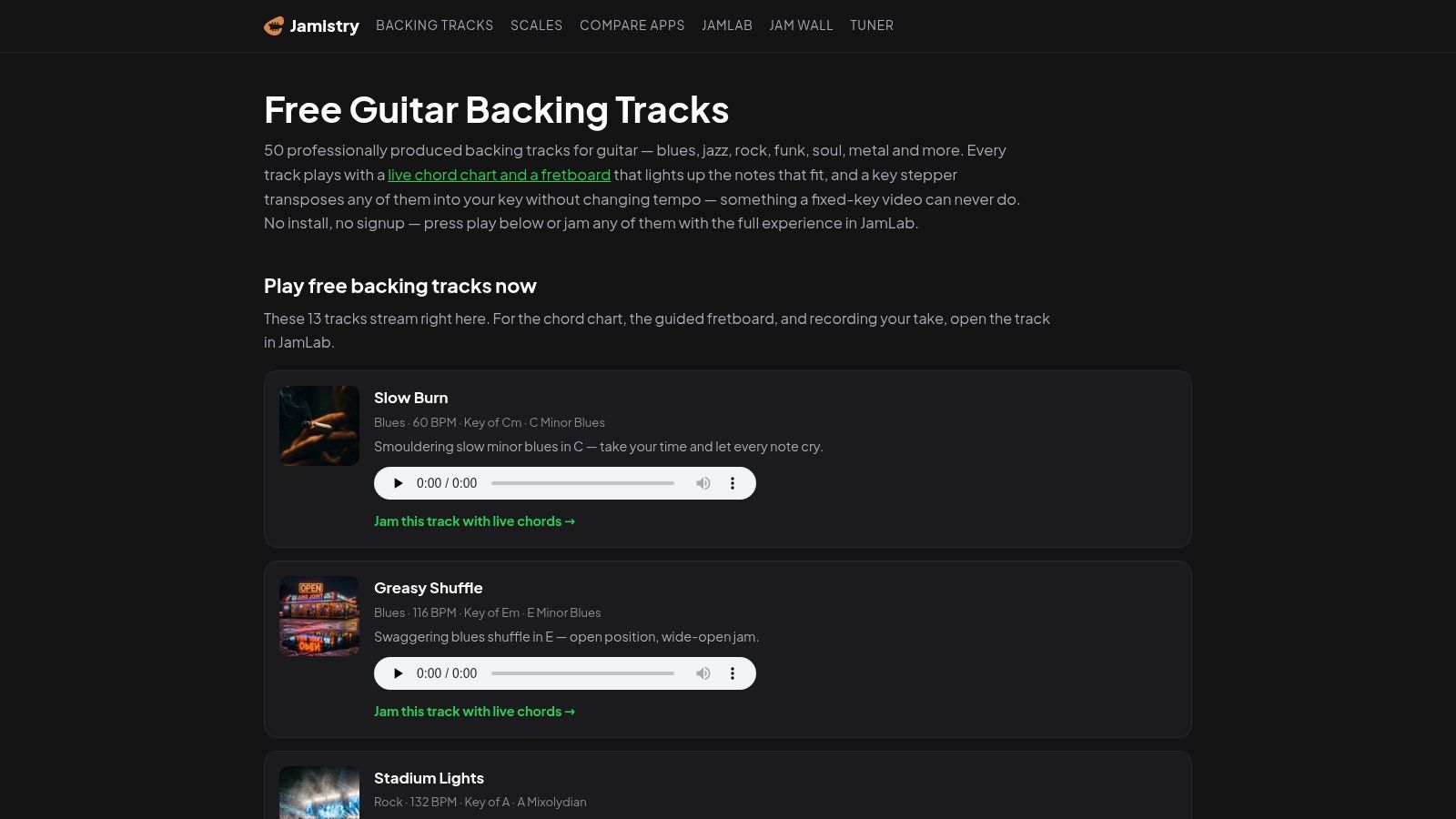
The feature that earns its keep is context. JamLab overlays live chord charts and a guided fretboard while the track plays, and transpose shifts the key without dragging the tempo with it. If you're learning to hear changes instead of guessing at them, that combination is worth more than a bigger library.
- 50 tracks, 13 on the page: the backing-tracks page streams 13 directly, and the full 50-track experience lives inside JamLab.
- Transpose without tempo drift: change key and the track stays at the same speed.
- No downloads: this is a browser practice tool, not a library you own.
The trade-off is honest. When I want to hear a progression while I play it, Jamistry is the tab I open first. When I want forty tracks on a phone for a weekend without wifi, it won't get me there. For the repetition side of practice, backing tracks for guitar practice covers how to structure a session around loops.
Try it at Jamistry.
2. Jamtrackers
Jamtrackers is an index, not a library. The audio comes from YouTube creators, and what the site adds is the metadata layer that makes those videos usable: search by genre, key, tempo, chord or scale, chord changes drawn on screen as the track plays, slow playback, and looping over a section you keep fumbling.
Where the Filters Earn Their Keep
Type in a key and a tempo and you get tracks that match the thing you're working on, not a random playlist. Scale and chord charts sit beside the player, so a D minor groove arrives with the shapes to try over it before bar one.
- Open listening: playback needs no account. A free account adds saved favourites and playlists.
- Two limits on the extras: the AI Guitar Teacher wants a verified email and runs on a daily allowance.
- No original catalogue: the audio is other people's uploads, so length and quality vary video to video.
That last point is the one to plan around. If the track you need doesn't exist anywhere, the workflow in isolating guitar from a song builds one from a recording you already own.
Start at Jamtrackers.
3. GuitarMaps
GuitarMaps keeps things plain: original backing tracks, organised by style and by key, streamed in the browser or downloaded as MP3s. The genre list covers blues, rock, funk, R&B and jazz, and the key categories split major from minor, which saves the guessing game when you need a specific tonality.
The downloads are the reason it made this list. Most streamed sites leave you with nothing you can carry.
Format rule: 320-kbps MP3 is the sensible compromise for daily practice, rehearsal, mobile playback and storage, while WAV is the better choice when you need uncompressed audio for recording or performance work, as Carmaster's guide to backing tracks explains.
That distinction matters here, because GuitarMaps offers MP3. If you plan to record a lead over the track and mix it, the format is already working against you before you play a note. For playing along, it's plenty.
- Offline practice works: downloads mean no connection and no buffering mid-solo.
- Original recordings: you're not relying on a directory of third-party uploads that can vanish.
- Personal use only: the stated terms limit these tracks to personal, non-commercial purposes, so don't build a paid video on top of them.
- Utilitarian interface: functional rather than slick, and there's no interactive practice layer.
Browse it at GuitarMaps.
4. Guitar Alliance
Backing Track Central is built for people who like a hoard, and that's a compliment. Material is grouped into collections, including classic rock and artist-focused sets, and each song folder can hold an MP3 backing track alongside a PDF guitar tab and a Power Tab file. The page advertises a bulk download of all tracks at 1.7GB.
That combination is rarer than it should be. Most sites give you audio and leave you to work out the part yourself.
- Track plus tab: you get the audio and the notation in the same folder.
- Bulk download: one large grab beats collecting files one at a time.
- Power Tab dependency: those files need compatible software before they'll open.
- Collection-first browsing: there's no filter by tempo or key, so finding a slow shuffle means scrolling rather than searching.
Check the linked download pages for current access requirements before you plan a session around them, and read the terms before using anything beyond personal practice. My advice is to treat it as a song-based library: pick the song, learn the part from the tab, then play it against the track. That sequence is one of the few ways a backing track teaches you something you couldn't hear on your own.
Start digging at Guitar Alliance.
5. Nick Neblo
Nick Neblo's collection is broader in instrumentation than most guitar-only sites, which makes sense given it's aimed at guitarists, singers, teachers and other musicians. Tracks are sorted by style and key, and the styles run from rock, blues and funk through Latin, flamenco and ballads to metal.
What separates this one from a random download page is that the creator explains the permissions. Tracks are free for learning and practice, some YouTube and Facebook uses are allowed with credit, and resale or broader commercial use is out. That's more clarity than most sites offer in a paragraph, let alone a licence line.
What Free Still Doesn't Cover
Listen to a track, download it, put it under a video, and play it at a paid gig, and you've crossed four different permission lines. LeftyFretz's discussion of backing-track legality points out that the composition and the sound recording carry separate rights, and that royalty-free doesn't automatically mean free for every use.
- Streaming and platforms: the easiest no-cost route, and the one to use first.
- Lossless downloads: these may run through Bandcamp at a price, so don't assume the free claim covers every format.
- Credit requirements: where credit is required, put it in the video description, not in a pinned comment.
Visit Nick Neblo.
6. TutorGuitar
TutorGuitar is aimed at the teaching side of the market, which shapes everything about it. Downloads run across rock, pop and metal, and individual tracks come with suggested scales, so the D minor rock track suggests D minor pentatonic or natural minor before you've plugged in.
That suggestion is small and useful. Newer improvisers stall because they don't know which shapes fit the backing, and a one-line pointer removes the stall.
The site describes its tracks as copyright-free for teaching projects and online videos, which is more permissive than most. The catch is access: free downloads require joining the mailing list.
What the evidence says: an educational study of backing-track use reported gains in posture, basic technique, pitch, intonation, phrasing and song interpretation, but the improvement was uneven, at just 2.1% for phrasing and timing against 21.6% for posture, according to the published study.
Read that as a warning about expectations, not a reason to skip tracks. A backing track improves how you hold the instrument and how cleanly you fret because it gives you something to lock into. It won't hand you groove on its own. Record yourself once a week without any accompaniment and you'll hear the difference between playing in time and playing along.
Join the list at TutorGuitar.
7. GuitarToneMaster
GuitarToneMaster presents itself as a free archive of guitar jam tracks, with thousands of entries and practice information attached to each: key, tempo, tone notes and scale suggestions. It's built around improvisation rather than song learning, and the tone notes are the detail most libraries skip. Knowing a track sits in A minor at 90 BPM is standard. Knowing the backing was recorded with a cranked tube-amp sound tells you whether to reach for single-coil spank or humbucker weight before you hit play.
"Thousands" is a claim worth auditing before you invest an evening, and the way to audit any archive is checking whether you can browse by key. For a concrete sense of what a countable free catalogue looks like, Infinite Guitar's backing-track index lists 313 free backing tracks broken down as 93 rock, 76 fusion, 53 unspecified-style, 40 funk, 13 jazz and 12 blues. A library you can count is a library you can plan around.
- Practice metadata: key, tempo, tone and scale notes on each track page, so the guessing happens before you plug in rather than after.
- Improv-first design: the archive is organised around jamming rather than learning covers, which suits players building vocabulary over players learning songs.
- Cost of entry: streaming and jamming on the site costs nothing; treat any download or file use as personal practice material unless the track page says otherwise.
That last point is where "free" needs its usual unpacking. Free to stream for practice is the common version of free across these archives, and it covers ninety percent of what most players need. Free to record over and post is a different license entirely, so check the terms on the track page before a video goes up.
Try it at GuitarToneMaster.
8. Quist
Quist is a creator-run source of original jam tracks with a heavy blues weighting, and the depth shows in the titles. Slow blues, shuffles and different feels, each labelled by key and style, so you can find a slow minor blues in the right key without auditioning twenty videos.
For blues improvising, that specificity is the whole game. You don't need a thousand tracks. You need one in the key you're working on, at a tempo you can survive, in a feel you recognise.
Streaming on YouTube is the easy no-cost route. Downloads and packaged collections sit behind a price, and some individual tracks are marked free while others aren't.
The free option is therefore mostly a listening and playing option, not a library-building option. That's fine as long as you know it before you plan a setlist around it. If you need a file for a gig, plan to pay or plan to build your own from a recording you own.
The catalogue leans blues, so a player hunting progressive metal or modern pop will run out of material fast.
Start with the blues at Quist.
9. Elevated Jam Tracks
Elevated Jam Tracks is a YouTube channel rather than a website, and it does the simple thing well: blues, rock and ballad-style jams, free to stream, with some videos stating the key in the title or description. Recent uploads show up quickly in search, which matters when you want a track in the next five minutes.
The friction is close to zero, and that's the point.
When Streaming Runs Out
A YouTube video isn't a track file. You can't drop it into a DAW at the right sample rate, you can't reliably loop eight bars without the player fighting you, and adverts interrupt long practice sessions unless you pay for the platform.
The creator also offers material through Patreon, so check individual videos or the channel page if you need downloadable files or extra access.
- Fast start: no signup, no email, no library to build.
- Variable information: key and tempo details depend on what each uploader wrote in the description.
- Playback limits: looping and speed control belong to the video player, not to your practice needs.
If you'd rather make the file yourself, how to create backing tracks walks through turning an existing recording into something you own as a practice asset.
Watch at Elevated Jam Tracks.
10. Billy Shuler
Billy Shuler's collection is the most practical entry on this list for rock and metal players, because every track is self-recorded bass and drums with the guitar part deliberately left out. You're playing over a rhythm section built for the missing instrument, not a karaoke backing with a guitar buried underneath.
The song selection leans hard into rock and metal, with material associated with Megadeth, Pantera, Blink-182, The Offspring and Black Sabbath. Many tracks include a tab link, which turns a practice session into a lesson.
The creator says the tracks are free to download without signup. That's the cleanest access arrangement here: no list, no account, no streaming-only restriction.
- Playable arrangements: bass and drums only, so nothing fights your guitar part.
- No signup: download and go, which matters when you're mid-session.
- Recreated parts: these are backing arrangements, not the original multitrack recordings, so treat the feel as an interpretation.
- Narrow genre range: rock and metal only, with little for a jazz or fingerstyle player.
For riff practice inside a DAW, I'd start with a downloaded file that has no vocals or guitar, exactly what you need to loop a verse at 80% speed.
Download at Billy Shuler.
Free Guitar Backing Tracks Compared
| Item | Free Download | Signup Needed | Best For |
|---|---|---|---|
| Jamistry | No; free tracks stream online | No for streaming | Interactive chord and fretboard guidance |
| Jamtrackers | No; tracks stream from YouTube | No to listen; optional account for favorites and playlists | Finding tracks by key, tempo, chords, or scales |
| GuitarMaps | MP3 downloads available | Not specified | Offline practice across genres and keys |
| Guitar Alliance | Downloadable tracks and a bulk collection advertised | Check linked download pages | Song-based practice with tabs and backing tracks |
| Nick Neblo | Some tracks available; lossless downloads may cost money | Not specified | Practice across varied styles and instruments |
| TutorGuitar | Yes; free downloads require mailing-list signup | Yes; join the mailing list | Teachers and students using scale suggestions |
| GuitarToneMaster | Download options unclear | Not specified | Guitar improvisation with practice notes |
| Quist | Some downloads available; others are paid | Not specified | Blues improvisation, especially via free streaming |
| Elevated Jam Tracks | No; free tracks stream on YouTube | No for streaming | Quickly playing along with blues, rock, or ballads |
| Billy Shuler | Yes; free downloads | No | Rock and metal practice with bass-and-drum tracks |
Building a Practice Library Without Crossing the License Line
Three checks settle most of the confusion. First, find out whether you're streaming or downloading before you fall for a track, because a perfect slow blues that only plays in the browser is a demo, not a resource you can loop offline. Second, read the permission line rather than the word free. Practicing at home and publishing a video are two different activities, and plenty of licenses cover the first while stopping at the second.
Third, keep a short list rather than a long one. Four sources matched to your needs beat twenty bookmarked sites: one blues catalogue for improvisation, one song-based library with tabs, one filter-driven index for when you need a specific key and tempo, and one interactive tool for learning changes. Everything beyond that is duplication, and duplicate tracks eat practice time while you hunt for the version you wanted.
The demand behind all this is real, even if nobody counts free-track users directly. One industry estimate cited by Truefire's guide to backing tracks for guitar practice valued the global guitar-instruction market at $936.15 million in 2021, with a projection of $2.2297 billion by 2033, and put the guitar-practice-software market at $397 million in 2024, projected to reach $484.95 million by 2033. Those figures describe the wider instruction category, so treat them as a sign that publishers keep investing in practice material rather than as a valuation of free tracks.
If the track you want doesn't exist, make one from a recording you already own. Isolate Audio's free plan includes 5 audio separations per month, MP3 output and files up to 5 minutes, which covers pulling a guitar part out of a song you've bought and playing over what's left.
One last piece of housekeeping. If you teach, or you sell lessons built around these tracks, their free invoice tool keeps the billing side from eating your practice time.
Free backing tracks suit an audience of one, and that works until you want the sound of a specific song rather than a generic groove. Isolate Audio lets you upload a recording, describe the part you want removed in plain English, and download both the isolated element and the remainder, so a track you already own becomes a practice backing in minutes. Start free with 5 separations a month and see whether your own record collection beats every list on this page.