
Two Songs Mixed Together: Get Cleaner Blends
You've lined up a vocal with a backing track, matched the tempo, and hit play. The verse almost works. Then the chorus arrives, the bass turns muddy, and the singer suddenly sounds like they're arguing with the music.
Getting two songs mixed together cleanly takes more than compatible metadata. You need to decide which musical parts deserve space, remove the ones that compete, and check distribution rights before you upload. Often, the fix isn't another plugin. It's using less of each song.
Match Tempo and Key Before You Blend
Two tracks can share a tempo and key yet clash when the vocal reaches the chorus. The singer might sustain a note against an incompatible chord, or the basslines might resolve at different moments. Matching BPM and key is a starting condition, not a musical approval stamp.
Use a BPM and key finder to establish a starting point, then verify the result by listening. Automatic detection can misread half-time or double-time material, and a waveform that looks aligned doesn't prove the transients sound aligned.
The useful workflow is to analyze tempo, beat grid, key, and phrasing before stretching anything. A practical acceptance test is stable synchronization across 16–32 bars without obvious drift or sustained melodic conflict, following the tempo and phrase-alignment workflow.
Tempo and key match rules
Treat these as audition decisions rather than guaranteed compatibility ratings. Stretching quality depends on the source, the algorithm, and how exposed the processed element is.
| Gap or relationship | Typical effect | Action |
|---|---|---|
| Small tempo gap | Often needs relatively little processing | Keep the lead track's tempo and adjust the supporting track |
| Moderate tempo gap | Sustained vocals can expose stretching | Compare the original and processed vocal |
| Larger tempo gap | Smearing and unnatural vocal texture become more concerning | Try elastic audio with formant preservation |
| Very large gap or half/double-time reading | Heavy stretching, or a misleading analysis result | Verify the pulse, then consider an intermediate tempo or different element |
| Same key | Useful starting compatibility, not a guarantee | Check the actual chords under the vocal |
| Relative major and minor | Shared pitch material can help | Audition the chorus rather than trusting the label |
| Neighbouring keys on the circle of fifths | Potentially workable harmonic relationship | Test sustained hook notes carefully |
| Semitone or tritone apart | Exposed melodic layers may clash | Pitch-shift a stem or choose a less harmonic element |
Protect the part listeners recognize
For a vocal at 100 BPM and a backing track at 128 BPM, don't assume a large stretch will remain transparent. Try an intermediate tempo or elastic audio with formant preservation, as described in the workflow cited above.
Practical rule: Choose the lead track by the vocal you want listeners to recognize. Bring the supporting material toward it, rather than damaging the vocal to preserve the backing track.
Choose Songs and Set Up a Test Loop
Song choice determines how much repair follows. Look for compatible section lengths and intros, so the musical changes can meet naturally instead of requiring constant edits.
The selection priorities are straightforward.
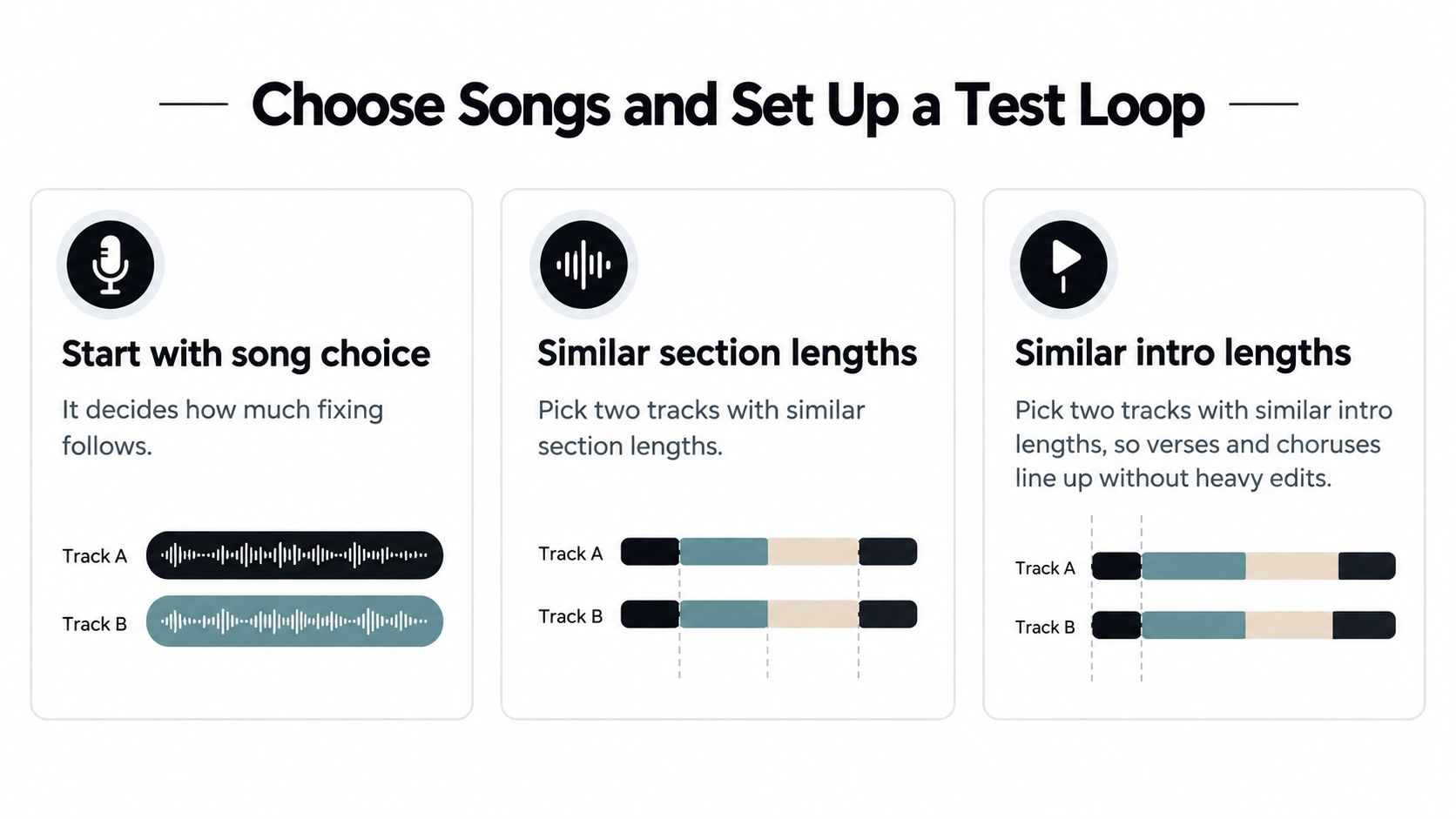
Start with a short test loop containing the most revealing overlap, not merely the easiest intro. Put the distinctive vocal against the supporting groove, then listen through the point where the harmony changes.
- Choose complementary roles: A hook and a drum bed are easier to evaluate than competing full arrangements.
- Test the difficult passage: Include a sustained vocal note, a chord change, or a busy fill.
- Keep reconstruction notes: Record original tempo, detected key, phrase start, processing choices, and separation settings.
Don't build the whole arrangement around a combination you've only heard in a flattering loop. A promising opening is permission to investigate, not a reason to commit.
How to Mix Two Songs Together, Step by Step
Work in an order that keeps musical decisions ahead of corrective processing. There's little value in polishing a vocal against an accompaniment you'll eventually replace.
The opening decisions establish the session.
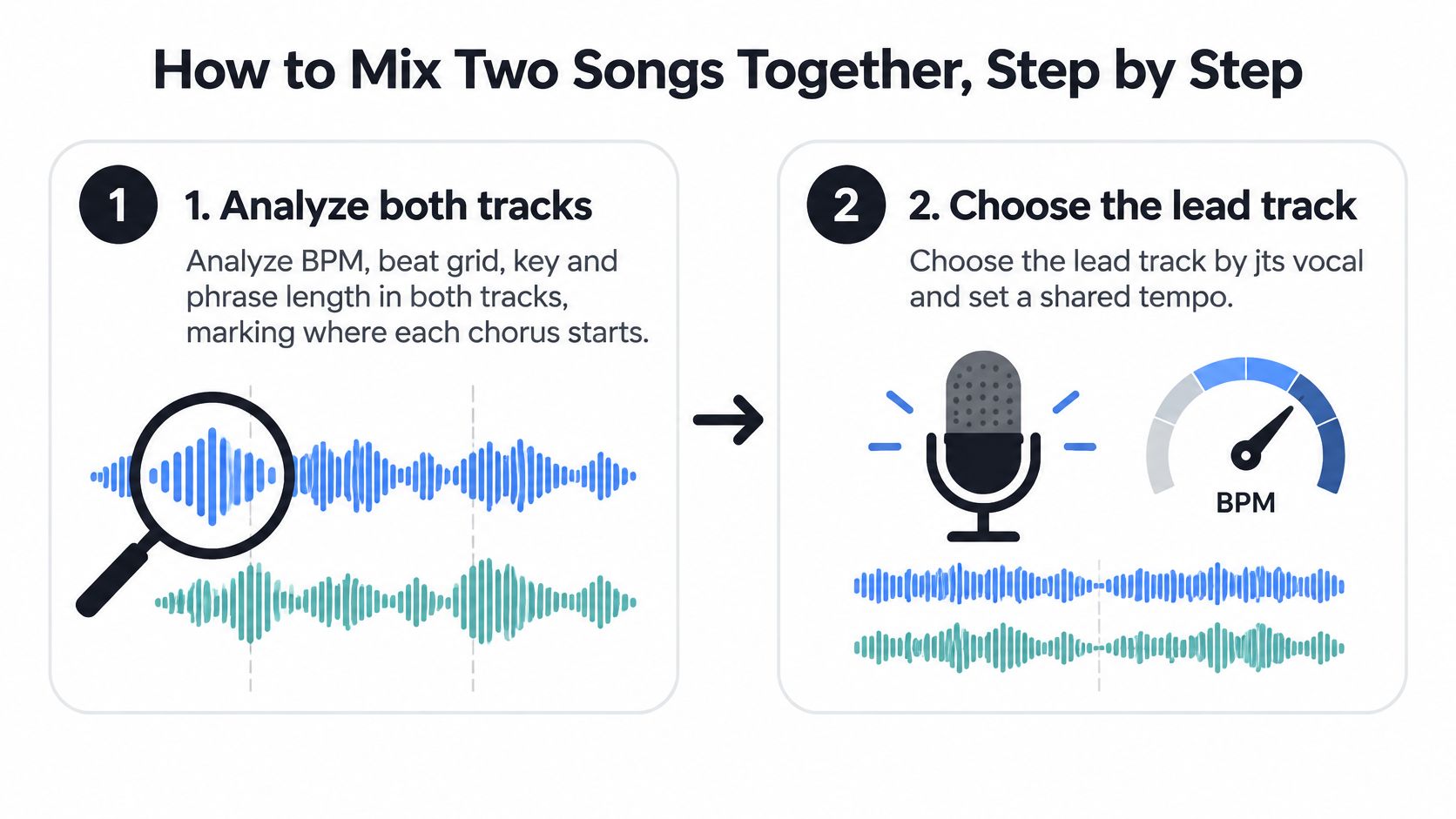
Analyze both recordings. Check BPM, beat grid, key, and phrase structure, then mark chorus entrances and other important changes. Listen while watching the grid. The common slip is accepting the analysis without noticing that the software has mistaken a secondary accent for the main pulse.
Choose the lead and shared tempo. Apply the vocal-first rule from the tempo section. Compare possible session tempos before making detailed edits, and save an untouched version of each source. If the singer loses their natural delivery, reconsider the tempo or supporting element rather than trying to fix everything later.
Stretch the supporting material. Use a suitable elastic-audio mode, with formant preservation where needed for vocals. Listen for softened drum attacks, watery cymbals, and unnatural vowels. A setting that flatters a sustained pad may be wrong for percussion, so process isolated parts separately when that gives you better control.
Align downbeats, then phrases. Start with the main rhythmic landing point, then check where the musical sentences begin and end. The phrase-length benchmark in “Match Tempo and Key Before You Blend” is useful here. Don't mistake a synchronized opening beat for an arrangement whose chorus will arrive naturally.
Resolve the harmonic relationship. Try transposing the backing track before changing the recognizable lead vocal. Listen to the actual hook against the accompaniment, not just a key label. If one chord consistently causes trouble, changing the selected passage or removing its melodic layer may sound more convincing than further pitch processing.
Play through a complete section. Include the transition into the chorus. Listen for competing fills, early chord resolutions, and backing melodies that interrupt the lyric. If the combination only works while you keep looping its strongest moment, it isn't ready for arrangement.
Establish a basic balance. Set the vocal at a useful listening level and bring the supporting track underneath it. Make only the corrections needed to judge the combination. If you're reaching for aggressive processing immediately, mute an element and test whether arrangement density is the actual problem.
Export a draft for review. Listen away from the editing screen and write down problems in playback order. Use “Fixing Phase, Low-End and Vocal Clashes” for diagnosis, then apply the readiness checks before sharing.
Change the source when the arrangement won't cooperate
Sometimes neither original drum part supports the blend well. If you're considering a replacement groove, Drumloop AI's guide to combine songs with AI drum loops provides a relevant alternative workflow to explore.
The important distinction is between repairing a good combination and forcing a bad one. If every section needs a different rescue operation, reconsider the source material.
Isolate Stems With AI for Cleaner Blends
A full acapella over a complete backing track is convenient, but it isn't always the right arrangement. The backing track may already contain a dominant piano line, vocal doubles, or a synth hook that competes with your chosen singer.
Selective separation lets you audition a smaller musical contribution instead of importing everything attached to it.
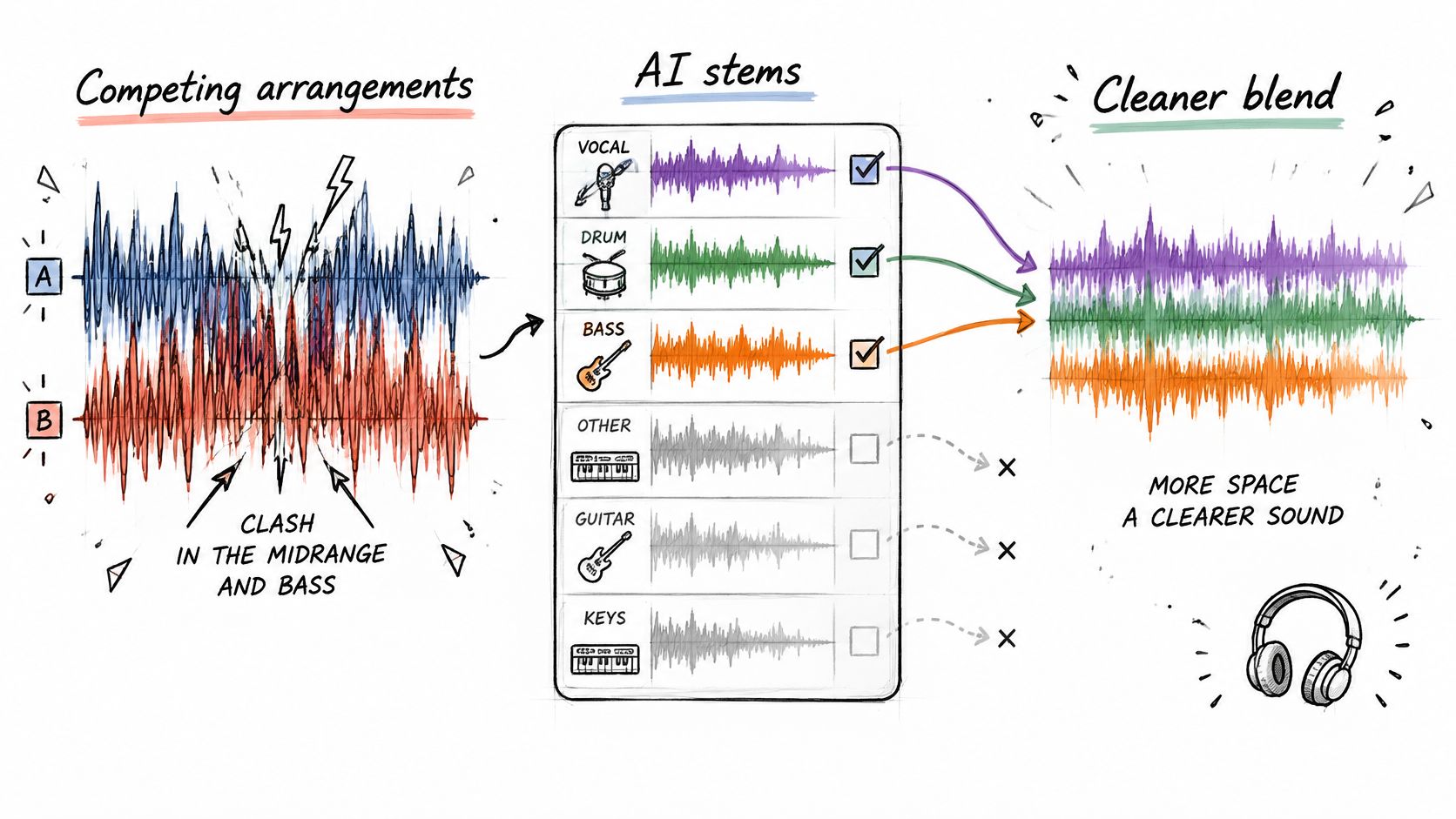
Alongside fixed-category stem separators, natural-language separation offers another approach. You can describe a target such as lead vocal, piano melody, kick and bass only, or crowd cheering, then work with the isolated element and the remainder.
Listen to both outputs before blending. The isolated file reveals unwanted bleed and processing texture; the remainder helps you hear what was removed, what survived, and whether the target was separated cleanly enough for its intended role. The guide to stems for songs provides useful context for choosing which parts to extract.
Match the extraction to the musical job
- A recognizable hook: Keep the hook from the supporting song without bringing its entire arrangement.
- An exposed lead vocal: Pair the vocal with a sparse accompaniment that leaves room for the lyric.
- A transition groove: Extract percussion rather than dragging a competing bassline through the overlap.
- A live-recording cleanup: Target crowd noise, then inspect the remainder for damage to the performance you want to retain.
The available Best, Balanced, and Fast presets let you compare processing options, while Precision Mode is intended for challenging overlaps such as vocals embedded in dense guitars. Accepted uploads include MP3, WAV, FLAC, and MP4, so the starting material can be audio or video.
For a visual walkthrough of the separation approach, use the demonstration below.
Separation artifacts remain a trade-off. A little bleed may disappear in a dense transition but become distracting during an exposed vocal entrance. Judge the extraction in context, and keep lossless output for the final render where available. Lossless delivery preserves the result; it doesn't repair an imperfect separation.
Fixing Phase, Low-End and Vocal Clashes
A mix that feels wide and powerful in stereo can turn thin when summed to mono. Before adding more bass or turning up the vocal, check whether a stereo layer is partially cancelling.
Other problems need different treatment. Doubled kicks can cause pumping, competing basslines can mask each other, and crowded upper mids can make vocal consonants harsh. Diagnose the symptom before choosing the processor.
Mix symptoms, causes and fixes
| Symptom | Likely cause | Fix |
|---|---|---|
| Vocal gets lost under the other track | Competing low-mid and midrange content | Remove nonessential vocal lows and make a narrow corrective cut in the competing layer |
| Boomy or pumping low end | Overlapping kicks or basslines | Choose a primary kick-and-sub source and filter unnecessary lows elsewhere |
| Thin sound in mono | Out-of-phase stereo content | Check layers individually, then adjust timing or remove the offending layer |
| Beat becomes loose as playback continues | Incorrect tempo, grid, or starting alignment | Verify the pulse and realign the phrase |
| Harsh vocal consonants | Crowded upper midrange | Reduce competing harshness and de-ess the vocal if needed |
| Crackle or distortion on export | Clipping or intersample peaks after limiting | Reduce the level into processing and inspect true peaks |
| Chorus melody clashes | Chord conflict beneath the hook | Change the selected element or transpose the appropriate stem |
For pre-master headroom, keep mix-bus peaks below approximately -3 dBFS, rather than relying on a limiter to contain the combined sources, following the headroom and mix-quality guidance.
Make room without hollowing everything out
Start with narrow corrective EQ before broad tonal shaping. High-pass only what isn't musically necessary: removing rumble from a vocal is different from stripping away its body. Likewise, don't filter a supporting instrument so aggressively that the blend loses the quality that made you choose it.
Automate deliberate handovers at phrase boundaries. When the singer enters, the competing hook might need to retreat or disappear rather than remain permanently quieter throughout the song.
If muting a layer makes the mix clearer without losing an essential idea, leave it muted.
For suspected phase trouble, isolate the affected layers and compare stereo with mono. Avoid treating every mono change as a timing error, because different parts may need different remedies. Re-timing can help an actual alignment problem; removing unnecessary widening or abandoning a redundant layer may be the cleaner choice.
Rights to Check Before You Upload or Sell
A technically excellent mashup can still require permission. Audio separation changes the file you're using, not the rights attached to the performance or songwriting.
The U.S. Copyright Office distinguishes copyright in a sound recording from copyright in the underlying composition. Its guidance on using preexisting music also explains case-by-case fair-use analysis through purpose, nature, amount used, and market effect. There's no automatic 10-second exemption, and creative transformation alone doesn't guarantee protection.
Permission needs by use case
| Use case | Who may need to give permission | Practical note |
|---|---|---|
| Private practice at home | Assess your source access and applicable rules | Keep the experiment unpublished; don't treat privacy as blanket permission |
| Live DJ set, recorded or streamed | Relevant recording, composition, and performance rights holders | Check venue and platform arrangements, especially before posting a recording |
| Unmonetized social media post | Recording and composition owners may both be involved | Lack of revenue doesn't establish permission |
| Monetized video or stream | Relevant recording and composition owners | Resolve permissions before enabling monetization |
| Commercial release | Owners of the recordings and compositions used | Obtain written licenses covering the intended release |
| Parody or commentary | Depends on the applicable exception and facts | Seek professional advice rather than assuming transformation is enough |
Build a clearance record
- Identify the owners: Track recording and composition ownership for each source.
- Define the use: Document the intended platform, territory, and distribution method.
- Keep written permissions: Make sure the granted scope matches your planned release.
- Describe the edits: Include isolated, transformed, and recombined material when discussing clearance.
Use the sample-clearance guide to organize those questions. For commercial work, get advice from a qualified music-rights professional in the relevant jurisdiction. Licensing is the predictable route to public distribution, not an administrative task to postpone until after release.
Decide Whether Your Mix Is Ready to Share
Don't approve the export just because the loud version feels exciting. Use a repeatable listening routine that separates a convincing arrangement from impressive playback volume.
- Bypass processing and compare the treated and untreated blend at matched listening levels.
- Inspect true peak and loudness meters, including sections where both songs are busiest.
- Collapse to mono and check that essential parts remain present.
- Listen at low volume on a phone speaker, then compare headphones and speakers.
- Confirm vocal intelligibility without relying on heavy limiting.
The headroom guidance cited earlier treats -14 LUFS as a normalization reference, not a universal creative mastering requirement. Your internal pass criteria should be no audible clipping, intelligible lead vocals, stable mono translation, and consistent loudness across the export.
Release decision: A mix needs both technical approval and an appropriate rights basis. Passing either test alone isn't enough.
If either check fails, keep the file private and resolve the specific issue. Once clearance and audio are settled, SCHelper's music rollout tactics for 2026 can serve as a separate release-planning resource.
Today, test alternative isolated elements against the same supporting track before committing to the arrangement. Choose the version that communicates the musical idea with the least competition, then retain the lossless export for finishing.
Isolate Audio lets you describe a sound in plain English and download the isolated element alongside the remainder. Upload your chosen recording, test a vocal, hook, or percussion extraction against the other song, and listen to both outputs before building the final blend.