
AI Remove Vocals: How to Get Clean Results
You have a chorus that almost works as a karaoke bed, and the lead is still sitting in the middle of it. A remix needs the drums without the singer. A guest talked over a music bed you can't unmix with a simple EQ cut. You want to AI remove vocals and ship something usable tonight, not chase a singer-free result that no model delivers.
A separated vocal is an estimate. Guitars, reverb tails, and doubled harmonies stay in the file when the arrangement is crowded. I would judge the download against the job, then stop. If the master is already crushed or low-bitrate, a cleaner source saves more time than another pass on the same damaged file.
Pick the Right Preset Before You Upload
AI removes vocals well enough for most jobs. No preset produces a perfectly silent backing track, so the goal is a result that passes the test for your use. In 2025, 87% of 1,241 surveyed music makers reported using AI somewhere in their workflow, according to a write-up of the LANDR survey. That volume doesn't mean every split is silent where the singer used to be.
| Setting | Best for | Processing speed | Switch when |
|---|---|---|---|
| Best | Studio-quality masters and final releases | Slowest of the presets | Final export once a test track passes |
| Balanced | Everyday remixes and practice tracks | Medium | Default for testing a new track |
| Fast | Quick drafts and rough checks | Fastest | You will re-run at higher quality later |
| Precision Mode | Dense mixes with overlapping instruments | Slower than Best, adds processing time | A Balanced result still shows bleed |
Start on Balanced to test a track, move to Best for a final export, and turn on Precision Mode only when a Balanced result still shows bleed. You trade time for cleanliness, not a magic upgrade. The high-quality presets page shows what each setting changes in the file. If the clip is speech over music, Contesimal's podcast editing guide is a solid next stop for the cut after the split.
How to Remove Vocals Step by Step
The graphic below is the part people skip, and it's the part that decides whether the model has anything left to separate.
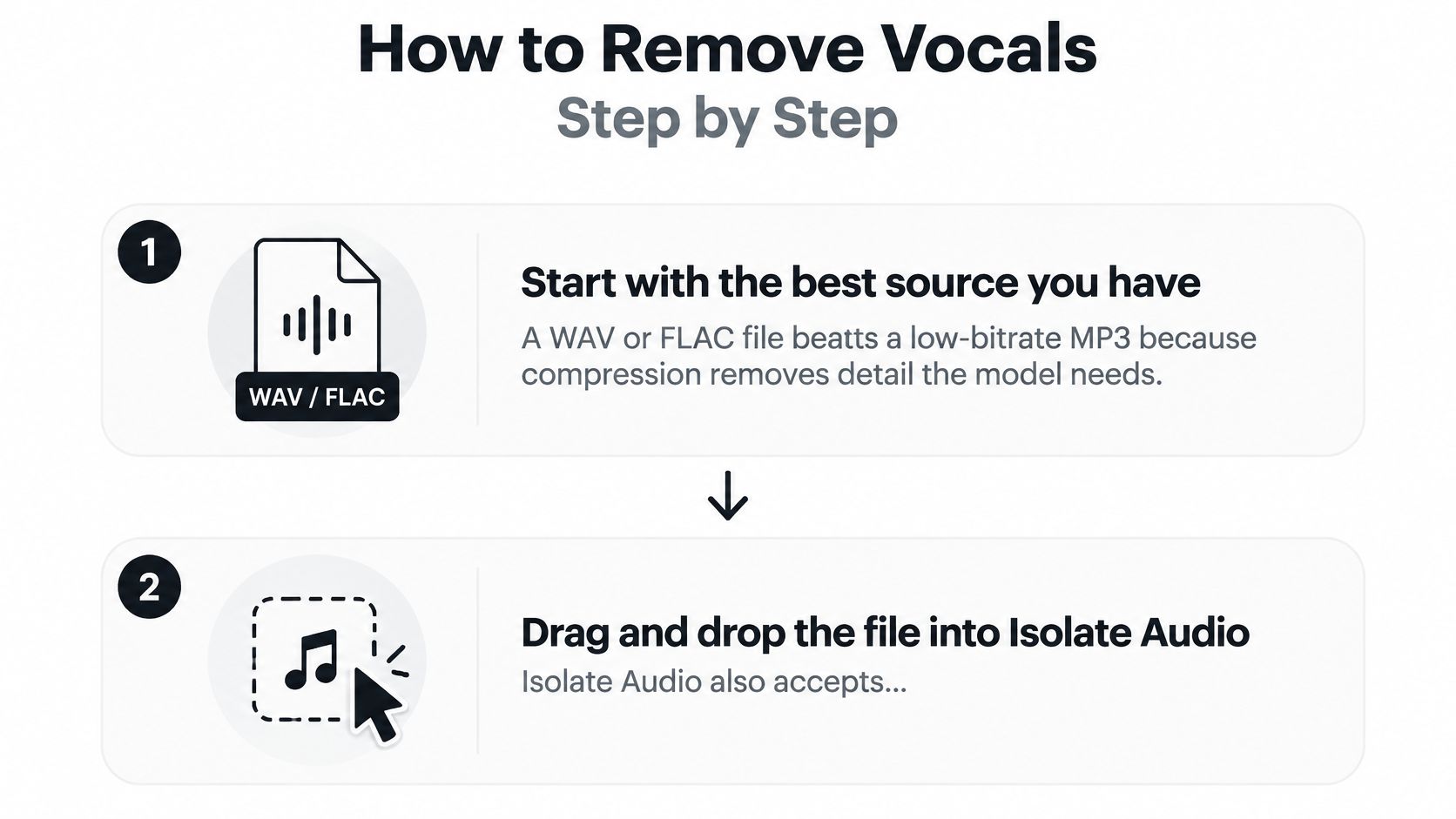
Feed it a file worth splitting
Start with the best source you have. A WAV or FLAC beats a low-bitrate MP3 because compression throws away the detail the model uses to tell a voice from a guitar. The usual slip is grabbing a chat-app copy and blaming the preset when consonants go missing.
Drag and drop the file into Isolate Audio. You drag and drop any audio or video file, so an exported video works without a separate audio rip. Isolate Audio works in three steps: upload your audio, describe the sound you want to isolate, then download your tracks. Don't bounce to a second converter first unless the container won't open.
Name the target in plain English. Type lead vocal when you want the singer, not a paragraph of instructions. A vague label pulls harmonies and room sound along with the lead. Keep the phrase short on the first pass.
Leave the preset on Balanced for a first listen. Fast is only for a throwaway check. Best is for the export you will keep. Switching presets before you've heard the remainder just burns a run.
Wait for the cloud job to finish. Processing runs in the cloud, so there's nothing to install. Longer files and slower presets take longer. Starting a second job on the same file while the first is still queued gives you two half-listens and no clear winner.
Listen in the right order
Download both outputs. Each separation returns the isolated sound and the remainder. The remainder is the backing track, and it's the file that shows leakage. Keep both even if you only planned to use one.
Play the remainder first, then the vocal. A ghost singer in the bed means the split under-removed the voice. Watery modulation on the isolated vocal means the split chewed the instruments that shared that band. A healthy result is a clear vocal with few instrument ghosts, and a remainder that still carries the full beat without a hollow gap where the singer sat.
Practical rule: If the beat goes thin the moment the vocal leaves, the source was already missing low-end detail. A slower preset won't invent it.
The same upload pattern helps when you need to remove narration from product demos and keep interface sounds underneath. The short walkthrough shows the click path before you spend a run on a long mix.
Wording Prompts to Isolate the Right Sound
The model separates what you name. A clear noun beats a generic one. You describe the sound to isolate in plain English, such as "Piano melody" or "crowd noise", and you get two files back. Both of them tell you whether the words matched the mix.
- Lead vocal, not vocals. Use this when the song has backing harmonies. "Vocals" often grabs the whole stack, including parts you wanted left in the bed.
- Spoken dialogue, not voice. An interview needs the guest's words, not every breath and room rumble labeled as a voice.
- Piano melody or crowd noise. The target doesn't have to be a singer. Name the instrument or the noise you want out.
- A narrower phrase on the second pass. If a trace remains, rerun with a sharper description. Stacking EQ on a bad prompt just hides the mistake.
Rerun the words, not a plugin chain
Run a broad prompt. Solo the remainder. If the speaker is still in the music, change the noun and run again. Comparing the two outputs is the check. A second separator on top of a sloppy label usually adds smear without removing the leak.
More phrasing sits on the natural language examples page. People writing picture prompts hit the same trap of a fuzzy noun, and these AI tribute video prompt examples show how a tighter description changes what comes back.
When the guest and the bed share a register
Say a host tries to pull background music out of an interview. The guest's voice sits in the same bass register as the bed, so a generic "voice" prompt takes mouth noise and bass guitar together. The fix was a dialogue-specific prompt plus Precision Mode, not a different app. Listen at the level you'll publish, especially on plosives, where the leak is easiest to hear.
A prompt is correct when the remainder contains the music and not the speaker.
If the remainder is music-only and the isolated file still has the guest's consonants, stop rewriting the sentence. The wording did its job.
How to Judge If the Vocal Is Good Enough
A result is good enough when it passes the test for its job, not when a benchmark number looks high. Solo the output, listen at the level you will publish, and compare about thirty seconds of a chorus with the original. Do that before you touch another setting.
| Use | Check first | Pass when |
|---|---|---|
| Karaoke | Vocal ghosting in the choruses | The instrumental stays clean when the vocal is solo |
| Remix or sample | Drum transients and reverb tails | Kicks and snares keep their attack |
| Practice track | Pitch stability and lead bleed | You can sing along without hearing the original lead |
| Transcription or dialogue | Consonants and sibilants | Words stay intelligible at normal volume |
| Commercial release | Artifacts on solo playback | No watery modulation after level-matched listening |
Karaoke fails when a chorus still whispers the original lyric under your singer. Solo the backing track on the loudest hook. If you can mouth the words from the ghost alone, it isn't a bed yet.
Remix or sample fails when kicks lose their click or a snare's tail turns into a wash. Transient damage is easier to hear on solo drums than in the full remainder. If the attack is gone, don't build a drop on that file.
Practice track fails when you can still sing the original melody because the lead never fully left. Pitch wobble on long notes is the other fail. You should be able to match pitch without chasing a second voice.
Transcription or dialogue fails when S sounds drop out and you have to rewind to catch a word. Play it at normal speaking volume, not soloed loud in headphones only. If a transcript would need guesses, the split isn't done.
Commercial release fails on solo playback when the vocal warbles or the bed pumps. Level-match it to the original before you decide. Headphones hide less of that than a phone speaker does.
Published vocal-separation scores rose from roughly 9–10.5 dB to about 12.7 dB within a short research period, yet residual bleed can remain obvious in a vocal practice track, dialogue edit, or remix, as a 2025 separation paper notes. SDR is an indicator. A few decibels can be obvious or irrelevant depending on the arrangement. If the file fails the row that matches your job, check the source before you chase another preset. Precision benefits matter on dense overlaps, not on a master that already threw the consonants away.
Fix Symptoms and Decide What to Do Next
What you hear usually points at the cause faster than another blind rerun. Spectral overlap between vocals and guitars or synthesizers, reverb and delay tails smeared across time, backing vocals grouped with the lead, and detail already destroyed by lossy compression are the recurring failures, and a technical walkthrough of vocal isolation is blunt about them. Newer generative systems can still add perceptible high-frequency artifacts. A fancier setting doesn't erase that.
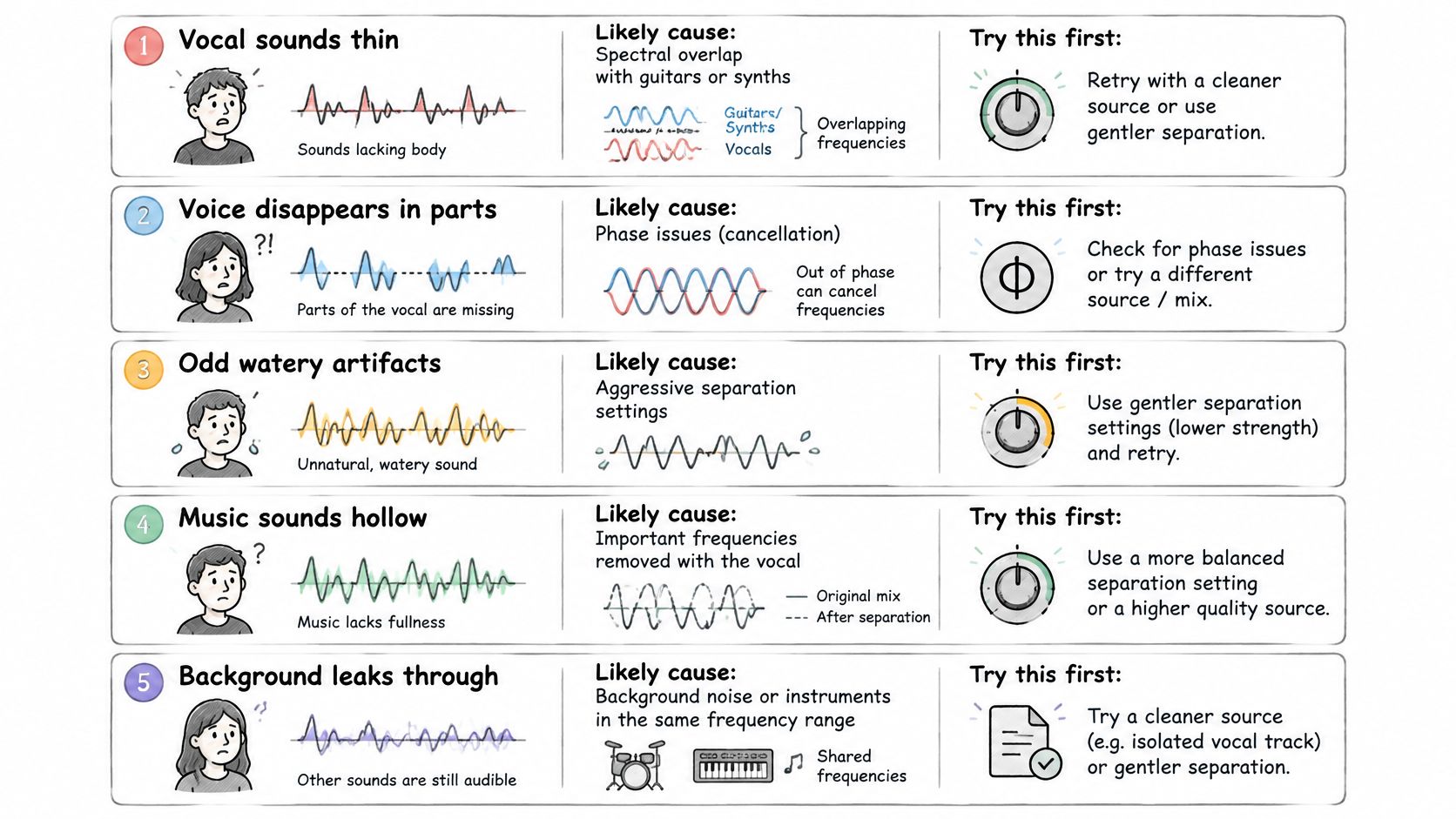
| Symptom | Likely cause | First fix |
|---|---|---|
| Watery, warbling vocal on a dense chorus | Aggressive separation on a crowded mix | Re-run on Best, then turn on Precision Mode |
| Guitar or synth bleed inside the vocal | Instruments share the vocal's frequency range | Narrow the prompt to lead vocal and use Precision Mode |
| Backing vocals vanish with the lead | Harmonies grouped with the lead voice | Prompt for lead vocal only and check the remainder |
| Reverb tail split across both outputs | Reverb treated as part of the vocal | Accept a small residue or use a drier source |
| Missing consonants on sibilants | Heavy compression or effects on the master | Re-run from a lossless source or a cleaner stem |
Clicks at a processing boundary are a windowing problem, not a broken song. Retry on a higher-quality setting or a lossless file before you assume the download is corrupt. Heavy mastering compression, doubled leads, and wide chorus effects leave residue no preset fully removes.
Three choices, then stop
Re-process when the output is close and the prompt or preset was the wrong one. Switch to Precision Mode when bleed persists on a dense mix. Precision Mode enables enhanced accuracy for complex audio with overlapping sounds. Find a cleaner source when the master is compressed, reverberant, or lossy, because another pass on a damaged file compounds the artifacts.
A remixer should look on the artist's release page for an original backing track or a multitrack before burning runs. A teacher stuck with a 128 kbps MP3 gets a cleaner practice bed from a WAV of the same song. The Free plan costs $0 forever and includes 5 audio separations per month, with standard quality processing, MP3 output, audio files up to 5 minutes, and community support. Spend those runs on the best file you can get, not on five copies of a crushed master.
Upload that source, run a lead vocal prompt on Balanced, and check the remainder. Stop when the vocal passes the test for its use. If it doesn't, change the source before you change the settings.
Isolate Audio separates the sound you describe in plain English and hands back both the isolated track and the remainder, so you can hear whether an AI remove vocals pass is good enough for karaoke, a remix, or dialogue. Presets and Precision Mode are there for dense overlaps, and a cleaner upload still beats rerunning a damaged master. Try a file at Isolate Audio.