Vocal Isolation Online: The Practical Guide to Clean Stems
You've got a recording that almost works. The interview is clear, but music sits underneath it. The remix needs an acapella, but the chorus is dense. The rehearsal track is usable, except the singer's reverb keeps surviving every “remove vocals” attempt. Uploading the file and pressing a generic vocal-remover button may produce something recognizable, but it rarely produces a stem you can trust without listening closely.
Vocal isolation online is more useful when you treat it as a separation task, not a magic eraser. The quality of the source, the exact target, the processing preset, and the way you check the result all affect whether the output sounds natural. This guide focuses on those decisions, including natural-language prompts, quality trade-offs, sparse and doubled vocals, heavy masters, and workflows for music, dialogue, karaoke, and transcription.
What Vocal Isolation Online Does
A remixer asking for “the vocals” usually wants every sung part while keeping the backing track. A podcast editor may need spoken dialogue without singing, room ambience, or background music. A producer working with a duet may want one singer only. Each request gives the separator a different target.
Vocal isolation estimates a chosen sound within a mixed recording. Traditional tools often sort audio into fixed categories such as vocals, drums, bass, and other. Natural-language separators allow more precise instructions, including “lead vocal only,” “spoken interview,” or “female harmony vocals.” The system then estimates the requested element and, in some workflows, the remaining mix.
The target determines what the result can retain. A general vocal prompt may capture lead vocals, harmonies, doubles, ad-libs, and some vocal effects. A single-singer request needs a clearer acoustic distinction or a tool that supports a more specific reference. Sparse vocals can leave the model with too little evidence, while doubled harmonies may merge into one stem. Heavy mastering can also make the vocal harder to separate cleanly.
For a deeper technical overview of how mixed recordings are decomposed into separate components, see this guide to audio source separation. The practical point is simple: the separator estimates overlapping sounds from evidence in the mix. It does not retrieve hidden original tracks.
Practical rule: Describe the sound you want to keep, not only the sound you want removed.
Online vocal isolation can process songs, interviews, videos, rehearsal recordings, and other mixed media. It supports acapella creation, production, dialogue editing, practice tracks, and speech-focused analysis. It cannot restore information that the original mix masked or discarded, so judge the output against the recording's limits rather than expecting the download to recreate a studio stem.
Preparing Your File Before You Upload
The upload is part of the audio workflow. A clean original gives the separator more information to work with, while repeated conversions, clipping, and unnecessary downmixing can make artifacts harder to avoid.
Start with the least processed source
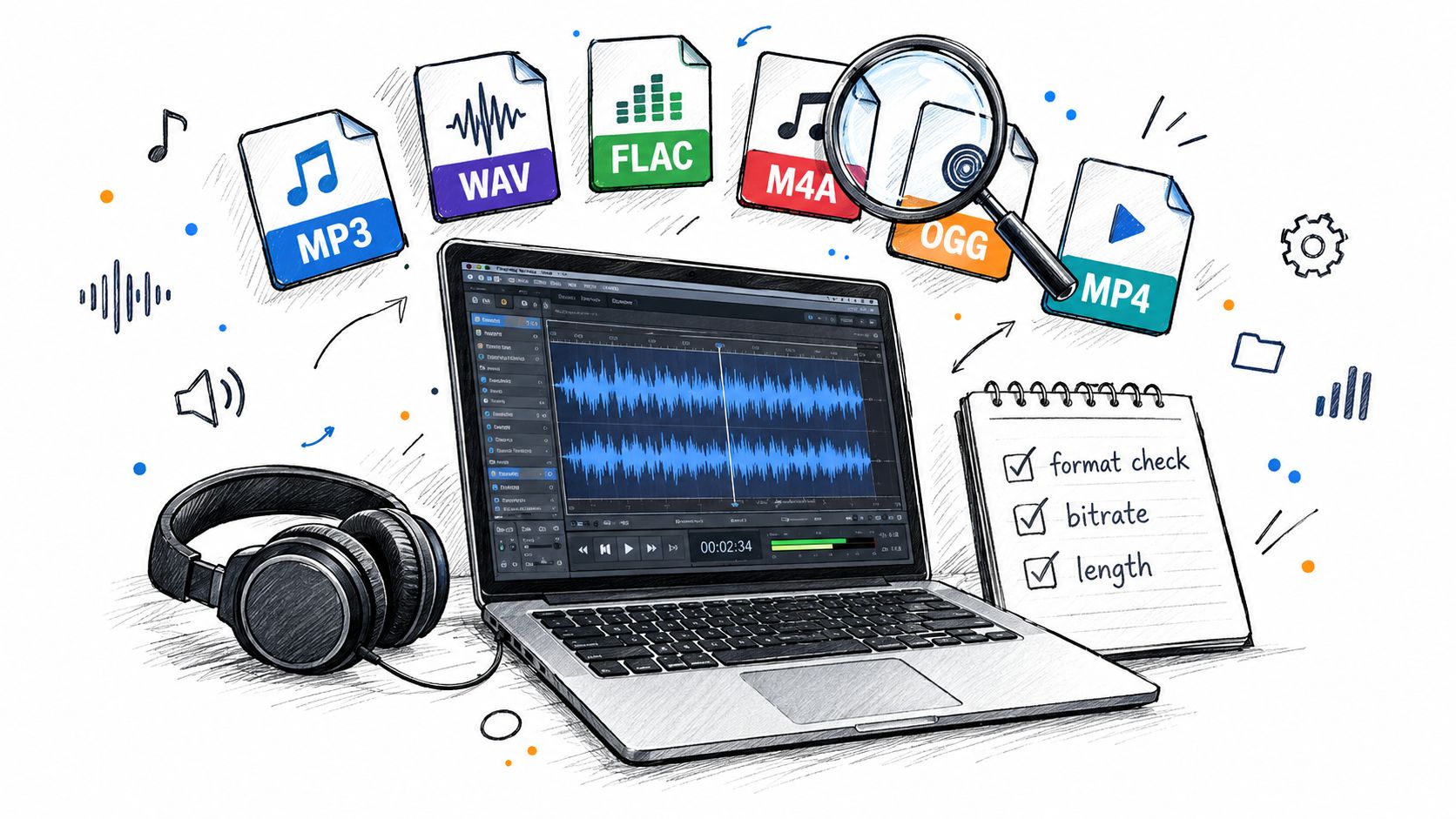
If you have a WAV or FLAC master, use it instead of converting it to MP3 first. MP3, M4A, OGG, MP4, and WebM may still be practical depending on the service, but lossy compression can add ringing and smearing around consonants, cymbals, and high vocal effects. Video files are convenient when the audio only exists inside a camera or screen recording, though you should check that the video contains the intended audio stream.
Keep the original sample rate where possible. If you must resample, do it once with a good-quality converter and preserve stereo channels. Stereo information can help a model distinguish a centered vocal from wider instruments, room sound, or panned effects. Converting to mono before upload may be useful for a single-channel speech recording, but it can remove spatial clues from a music mix.
Trim without damaging the performance
Remove long silence before the target begins if you're testing a short excerpt, but don't cut breaths, reverb tails, word endings, or musical pickups. Those details help you judge whether the separator preserves natural transitions. For a full-length file, divide it into sensible working excerpts when the platform or project requires it, and keep the original untouched for final processing.
Use this pre-flight checklist:
- Source quality: Choose the original lossless file when available.
- Channels: Preserve stereo unless the recording is mono.
- Levels: Prevent clipping, but don't apply aggressive limiting or noise reduction before separation.
- Content: Include a representative passage with the hardest overlap, not only a clean opening.
- File length: Test a short excerpt before committing to a long upload.
- Naming: Include the source, target, and version in the filename so stems don't become ambiguous.
A practical explanation of why background level affects perceived separation is available in this guide to signal-to-noise ratio. The same principle applies here: a cleaner input doesn't guarantee a perfect stem, but it reduces avoidable uncertainty.
Uploading, Choosing a Preset, and Writing Your Prompt
Once the file is ready, upload it and decide what the separator should preserve. A vague instruction such as “remove music” leaves too much room for interpretation. “Isolate the spoken interview voice and exclude the background song” gives the system a target, a context, and an exclusion.

Use prompts that describe source type, role, and boundaries:
- For an acapella: “Isolate all sung vocals, including lead, backing vocals, and harmonies.”
- For a lead vocal: “Isolate the main lead singer and minimize backing vocals, doubles, and background bleed.”
- For a podcast: “Isolate the spoken interview dialogue and exclude music, room noise, and other speakers.”
- For a video editor: “Isolate the on-camera speaker's voice while retaining natural speech tone.”
- For karaoke: “Remove all singing voices and preserve the backing track.”
“Vocals” is a reasonable starting point for a straightforward song. It becomes weak when the track contains layered singers, vocal chops, spoken samples, or prominent effects. Avoid stacking contradictory instructions, such as asking for “all vocals” and “lead vocal only” in the same prompt. If you need both the target and the remainder, choose a workflow that exports both outputs so you can check whether the remaining audio retained unwanted vocal residue.
The quality preset controls a practical balance between processing demand and output refinement. Best is appropriate for a final remix stem or a difficult full mix. Balanced is a sensible first comparison when the source contains sustained notes or modulation. Fast helps with quick tests and may preserve sharper transient behavior in some material. The high-quality preset guidance is useful when the project needs a more deliberate choice than just selecting the slowest option.
For dense choruses, reverb-heavy vocals, doubled lines, or instruments occupying the same frequency range, enable Precision Mode if available. Test it on a representative excerpt first. More processing isn't automatically better, and a longer run can still produce a vocal with warbling or missing consonants if the mix gives the model little separation evidence.
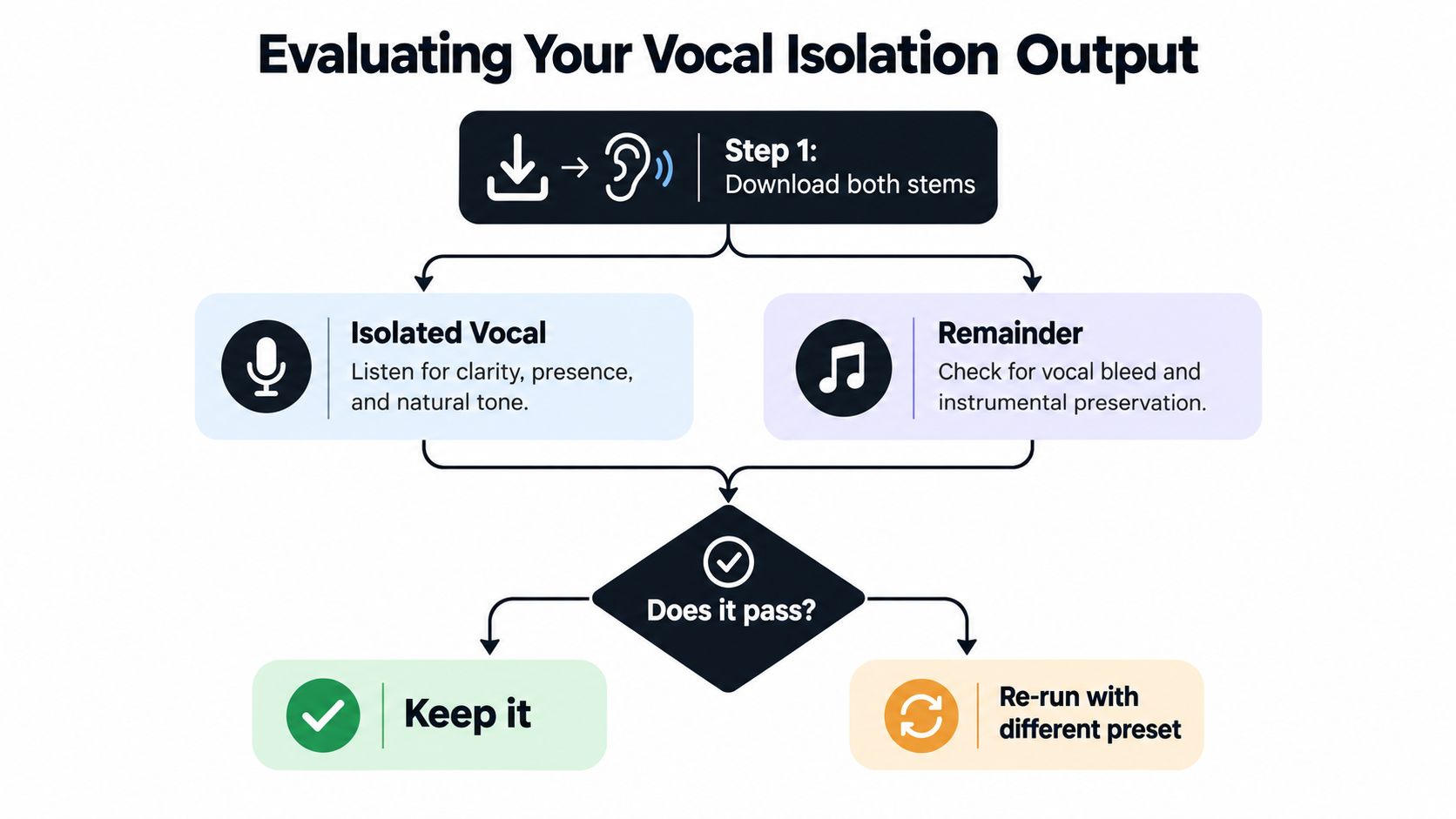
The workflow below is useful when you want to see how the isolated element and remainder relate rather than judging one file in isolation.
Evaluating the Output and Iterating
A vocal can sound convincing alone and still fail in the mix. Preview or download both outputs, then compare them with the original at matched loudness. Check whether the isolated vocal retains words, breaths, pitch movement, and a natural tone. The remainder should keep the backing track or background bed without obvious vocal phrases leaking through.
Listen for these failure modes:
- Residual bleed: Guitar notes, cymbals, reverb, or backing vocals remain in the target.
- Missing detail: Consonants, breaths, vocal attacks, or quiet line endings vanish.
- Modulation: Sustained notes acquire watery or robotic movement.
- Phase artifacts: Stereo width becomes unstable, hollow, or detached from the source.
Move between the original, isolated vocal, and remainder without changing the monitoring level. Start with difficult moments: a sparse verse, a dense chorus, a doubled phrase, and any line carrying delay or reverb. Sparse vocals can give the separator too little evidence, while doubled harmonies and heavy masters can make the target sound clean in isolation but collapse when the full arrangement returns.
Use a controlled re-run
Change one variable at a time. If the target is broadly correct but contains bleed, keep the source and make the prompt more specific. If the vocal is present but unstable, compare Balanced with Best and test Precision Mode. If a brief entrance disappears, process an excerpt containing the surrounding musical lead-in and lead-out, rather than isolating only the short phrase.
Prompt wording should identify the desired source and its context without adding conflicting instructions. For example, specify “lead vocal with breaths and consonants preserved” or “main singer only, excluding backing harmonies,” depending on the task. Short, intermittent phrases often need musical context around them to remain identifiable.
A short target reference recording can help when the system supports enrollment or reference audio. That workflow differs from separating all vocals. Singer-informed research reported an improvement in target-singer SI-SDR from 0.33 dB to 5.58 dB after adding a short enrollment recording under the study's conditions (a 2025 study on target-singer separation). Treat that result as evidence that target identity can help, not as a guarantee for every upload.
Use this decision flow:
- Keep it when the vocal is intelligible, natural, and usable in context.
- Switch the preset or Precision Mode when artifacts or bleed dominate.
- Rewrite the prompt or change the excerpt when the separator extracts the wrong vocal group or misses an intermittent line.
- Return to the lossless source when the upload was compressed, clipped, or repeatedly transcoded.
Do not rely on a dashboard score alone. SDR supports benchmark comparisons, but it measures distortion under defined conditions rather than creative usefulness. On MUSDB18, published systems have reported vocal SDR values from roughly 7.1 dB to 8.98 dB, depending on the method and evaluation setup (Keras evaluation guide). A stem can score well while still producing audible bleed, phase problems, or lost consonants, so the final decision belongs to the listener.
Choosing the Right Preset, Format, and Plan
The right setting depends on what happens after download. A podcaster may prioritize intelligibility and a manageable turnaround. A remixer needs a stem that survives further processing. A video editor may value a practical file size and compatibility with the editing timeline.
Preset, Format, and Plan at a Glance
| Choice | Best For | Trade-off |
|---|---|---|
| Best preset | Final stems, dense mixes, serious remix work | More processing demand and potentially longer waits |
| Balanced preset | General-purpose separation and comparison tests | A compromise between refinement and speed |
| Fast preset | Prompt testing, rough edits, and quick previews | May require a second pass for difficult material |
| WAV or FLAC | Further mixing, restoration, and archival work | Larger files and more storage |
| MP3, M4A, or OGG | Casual review, sharing, and lightweight delivery | Lossy encoding can obscure fine artifacts |
| Free plan | Experiments and occasional separation | Limits may affect volume, formats, duration, or queue priority |
| Pro plan | Repeated production work and longer workflows | Paid access is justified only when the extra capacity fits the job |
Pick Best with a lossless output when the stem will enter a DAW, receive compression, or be layered over a new arrangement. Pick Balanced when you're comparing prompt wording or processing several candidates. Pick Fast when you need to establish whether the target is present before spending time on a final run.
For formats, keep a lossless intermediate whenever the audio will be edited again. MP3 can be acceptable for a quick reference or a delivery where file size matters, but don't use it as the only master of a stem you may process later. FLAC preserves lossless audio with a smaller footprint than uncompressed WAV, while WAV remains a broadly compatible choice across music and video software.
Free access makes sense for a one-off experiment. A Pro tier becomes more practical when you need repeated separations, lossless exports, longer files, or predictable queue access. Check the current plan terms before committing because platform limits and included formats can change.
Troubleshooting Common Vocal Isolation Problems
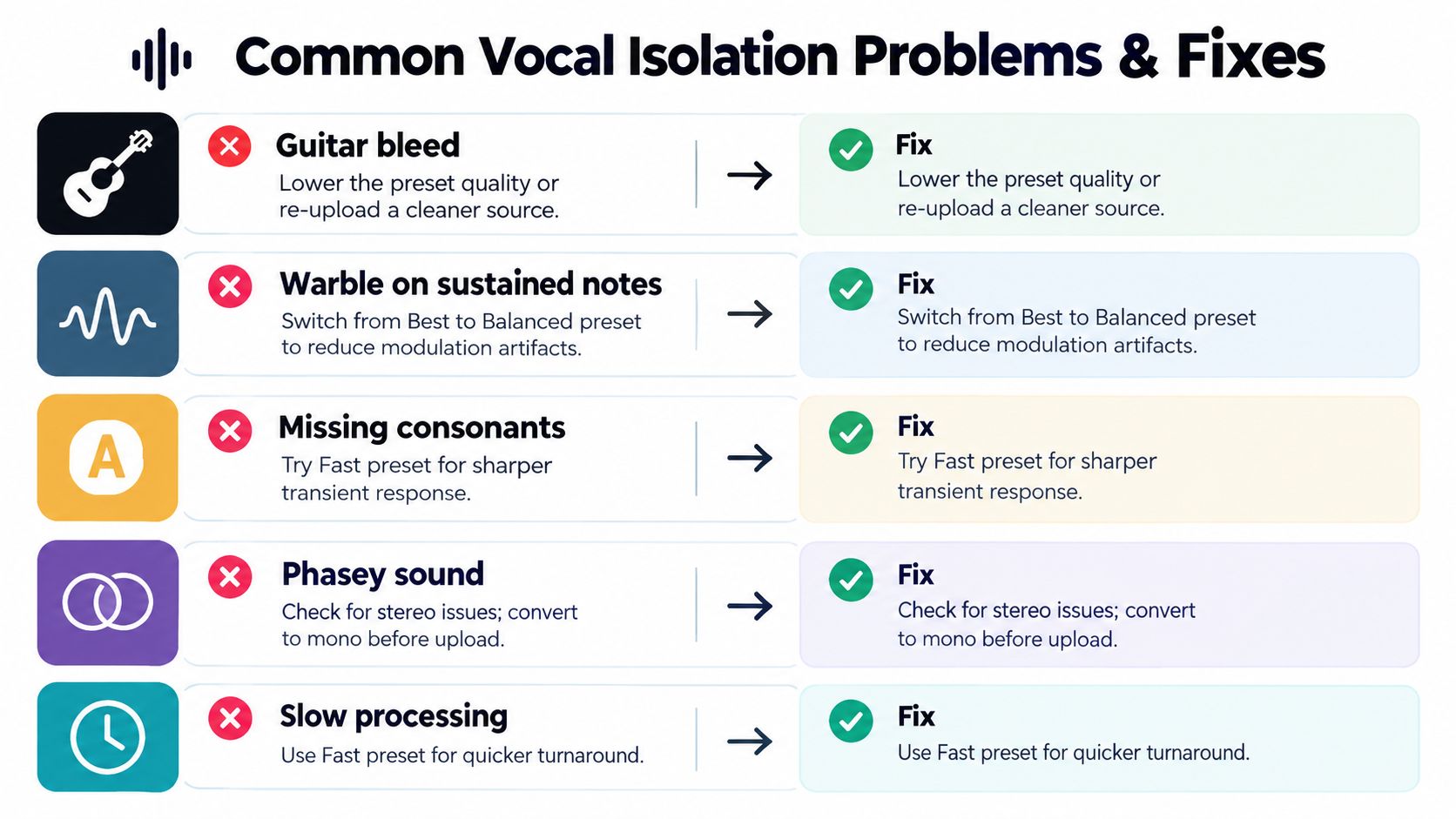
A clean-looking preset cannot overcome ambiguous source material. Start with the audible failure, then change the target wording, quality setting, or source file that addresses it.
Match the problem to the intervention
| Symptom | Likely cause | Practical response |
|---|---|---|
| Guitar or cymbal bleed | Shared frequency regions and masking | Tighten the target prompt, test Precision Mode, and compare the remainder |
| Warble on sustained notes | The model is estimating a continuous tone through competing content | Compare Balanced with Best and inspect the vocal in context |
| Missing consonants | Short transients are masked or treated as accompaniment | Test a representative excerpt and try a faster pass for comparison |
| Hollow or phasey output | Stereo relationships or effects are confusing the estimate | Preserve the original stereo file, then compare a carefully prepared mono test |
| Vocal disappears in a sparse line | The target occurs briefly or has little supporting evidence | Include surrounding context, specify the target, and use a reference recording if available |
| Poor result from a heavily compressed master | Clipping, pumping, and dense limiting obscure source boundaries | Re-upload the cleanest original and avoid adding more processing before separation |
Sparse vocals need a separate check. A singer who appears briefly between dense musical sections can be harder to retain than a continuously present lead. Intermittent vocal regions remain difficult for conventional separation methods, so inspect the quiet entrance and line ending as closely as the loud chorus. If a sparse phrase vanishes, include more surrounding context in the upload and describe the target precisely, such as “isolated lead singing with quiet phrase endings preserved.”
Doubled harmonies create another failure mode. A prompt such as “lead vocal only” may still retain harmony energy because the voices overlap in timing and frequency. If the tool accepts a reference recording, provide one when the singer's identity matters. If the goal is every sung part, request “all vocals, including lead, backing, doubles, and vocal effects.” That broader target can preserve more material, but it also increases the chance of backing-track or reverb residue.
Heavy masters often produce worse stems than cleaner mixes. Clipping, pumping, limiting, and stereo widening blur the boundaries the separator must estimate. Re-upload the cleanest available source, avoid adding processing before separation, and compare the result with the original in context. A vocal that sounds acceptable alone may reveal cymbal swells, guitar tones, or reverb tails once placed over a new arrangement.
Benchmark figures require careful interpretation. Open-Unmix reported 5.3 dB SDR on MUSDB18, while a later reported model reached 7.61 dB average SDR across the benchmark's vocal, bass, drums, and other sources (JOSS reference paper). Those controlled results do not predict the behavior of an arbitrary upload. A broadcast-monitoring study found source isolation improved audio-fingerprinting F1 score by 7 percentage points for two systems and 22 percentage points for another, but improved fingerprinting does not guarantee a clean-sounding vocal stem (broadcast-monitoring study).
For questions about uploads, playback, or account behavior, browse creator platform help. For audio quality, use controlled listening comparisons rather than one accuracy figure.
Accessibility testing adds another consideration. Cleaner speech can help a listener or transcription system by reducing competing sound, while separation artifacts may smear consonants or introduce musical modulation. Research involving speech masked by competing speech and singing music evaluates these outcomes for cochlear-implant users, and audio-visual separation research reported 71.88% test accuracy for isolating and amplifying individual participants' speech in mixed scenes (PubMed study). Check intelligibility, transcription accuracy, and production quality separately.
Putting It All Together for Your Use Case
Keep this compact workflow beside your next job:
- Preserve the cleanest original and keep stereo unless there's a reason not to.
- Test a difficult excerpt before processing the entire file.
- Name the target precisely, including lead, backing, dialogue, or one speaker.
- Compare the isolated output and the remainder.
- Re-run by changing one variable at a time.
- Export a lossless intermediate when further editing is likely.
- Label every stem with the source, target, preset, and version.
For podcast interview cleanup, prompt for spoken dialogue and test overlapping speech, music beds, and room reflections. Compare the isolated voice with the original before sending it to transcription or publication.
For remix and acapella extraction, request all sung vocals when harmonies belong in the stem, then use Best or Precision Mode for the final pass. Check the remainder for vocal phrases before building a new arrangement.
For karaoke or practice tracks, request removal of all singing voices while preserving accompanying music. Listen for chorus bleed and vocal reverb because those remnants can be more distracting than a small amount of music residue in an acapella.
For transcription preparation, compare the original, isolated speech, and a lightly mixed version. The cleanest-looking waveform isn't automatically the easiest to understand, so judge words, consonants, accents, and competing speakers directly.
Keep the lossless master, label stems clearly, and don't transcode between formats without a reason.
Isolate Audio lets you upload audio or video, describe the target sound in plain English, and download the isolated element alongside the remainder. For your next vocal, dialogue, karaoke, or transcription job, try the workflow above with Isolate Audio, starting with a short difficult excerpt before processing the full recording.