
What Is Voice Isolation and How Does It Actually Work
Voice isolation is the process of separating a target speaker from other sounds in a recording, and one benchmark found that it reduced pooled word error rate by 73% across eleven speech-to-text configurations. The feature you use during a live call, however, isn't the same thing as an offline tool that separates a finished recording into an editable voice track.
The popular advice is to treat voice isolation as aggressive noise reduction. Turn it on, remove the background, and expect a clean vocal. That description is convenient, but it misses the difficult part. A system may remove a fan quite well and still struggle when another person speaks, music overlaps the dialogue, or the room adds a long reverberant tail.
For creators, the difference matters. A meeting app usually needs to make one microphone signal easier to understand immediately. A podcast editor, filmmaker, or musician may need a file they can inspect, rearrange, remix, and export after processing. Both workflows may use the phrase voice isolation, but they aren't asking the same technical question.
The Real Problem Voice Isolation Solves
Voice isolation starts with a narrower question than “How do I remove noise?” It asks, “Which parts of this mixture belong to the speaker I want to hear?” The unwanted material might be a keyboard, traffic, or air conditioning, but it might also be another human voice. That last case turns a familiar cleanup task into a source-separation problem.
A bartender offers a useful analogy. In a crowded bar, you can hear many sounds at once, yet you may focus on one regular customer because you recognize their voice and follow the words. Voice isolation tries to perform a similar selection on an audio signal. It estimates which patterns belong to the target speaker and suppresses competing sounds without turning down the entire room.
That distinction explains why ordinary noise reduction isn't enough. A steady fan often has a relatively consistent sonic pattern, while speech changes rapidly in pitch, rhythm, volume, and pronunciation. Another speaker produces the same broad category of signal as the target, so the system must distinguish one voice from another voice, not merely speech from silence.
Practical rule: If the unwanted sound is stable and unrelated to speech, denoising may be sufficient. If another person is talking, ask for voice isolation or source separation.
The two workflows also produce different results. A call-level feature processes the microphone feed while the conversation is happening, with responsiveness and intelligibility taking priority. An offline editor can spend more time analyzing a completed file and may provide an isolated stem plus the remaining audio. That makes later mixing possible, but it also exposes artifacts that a live call feature can hide.
Before choosing a tool, creators should separate two goals:
- Clear communication: Make one speaker easier to understand during a call or live broadcast.
- Editable production audio: Extract a voice or another sound from an existing recording for post-production.
For a practical introduction to ordinary cleanup techniques, this guide to removing background sound from audio provides useful context. The important point is that voice isolation isn't a universal “clean audio” button. It targets a speaker, and its success depends on what shares the recording with that speaker.
How Voice Isolation Got Here
Modern voice isolation grew from a long speech-enhancement lineage. Engineers first used analog equalization and related techniques to emphasize useful speech components. These methods could shape tone and reduce some interference, but they had limited information about what a speaker was saying.
Digital signal processing made more flexible approaches practical in the 1970s, when digital computers entered the field. A review of speech-enhancement history describes the progression from earlier analog methods toward spectral subtraction and later adaptive noise-cancelling techniques. Each approach tried to improve the relationship between speech and interference, often described through signal-to-noise ratio and speech intelligibility.
From tone shaping to spectral analysis
Spectral subtraction introduced a useful change in perspective. Instead of treating the recording only as a waveform, engineers could examine its energy across time and frequency. If a system estimated the background spectrum during a quiet moment, it could reduce similar energy from the speech-bearing sections.
That strategy works best when the interference behaves predictably. A constant machine hum is easier to estimate than a second person who keeps changing pitch and rhythm. Removing too much energy can also leave musical noise, a watery or artificial texture created when the algorithm subtracts portions of the signal unevenly.
Adaptive noise cancellation added another route. Rather than relying only on a fixed background estimate, an adaptive system can update its assumptions as the acoustic environment changes. Microphone arrays and beamforming can also use spatial information, such as the direction from which sound reaches different microphones. These techniques remain part of the broader toolkit, especially where latency and predictable processing matter.
The move toward learned separation
Neural systems changed the task from hand-designed rules to pattern recognition. A model can learn from mixtures containing speech and interference, then estimate which parts of a new mixture are likely to belong to the target voice. Training material can expose it to room reflections, background activity, cross-talk, and changes in speaking style.
That doesn't mean deep learning replaced older signal processing. Contemporary systems often build on the same foundations, including time-frequency analysis, filtering, and reconstruction. The learned model supplies better estimates, while conventional processing still helps transform those estimates into audible audio.
This history gives you a way to judge product claims. Ask whether a tool is reducing a known background profile, enhancing speech for a live stream, or attempting to separate overlapping sources. Those are related jobs, but they involve different assumptions and different failure modes.
How the Technology Separates One Voice
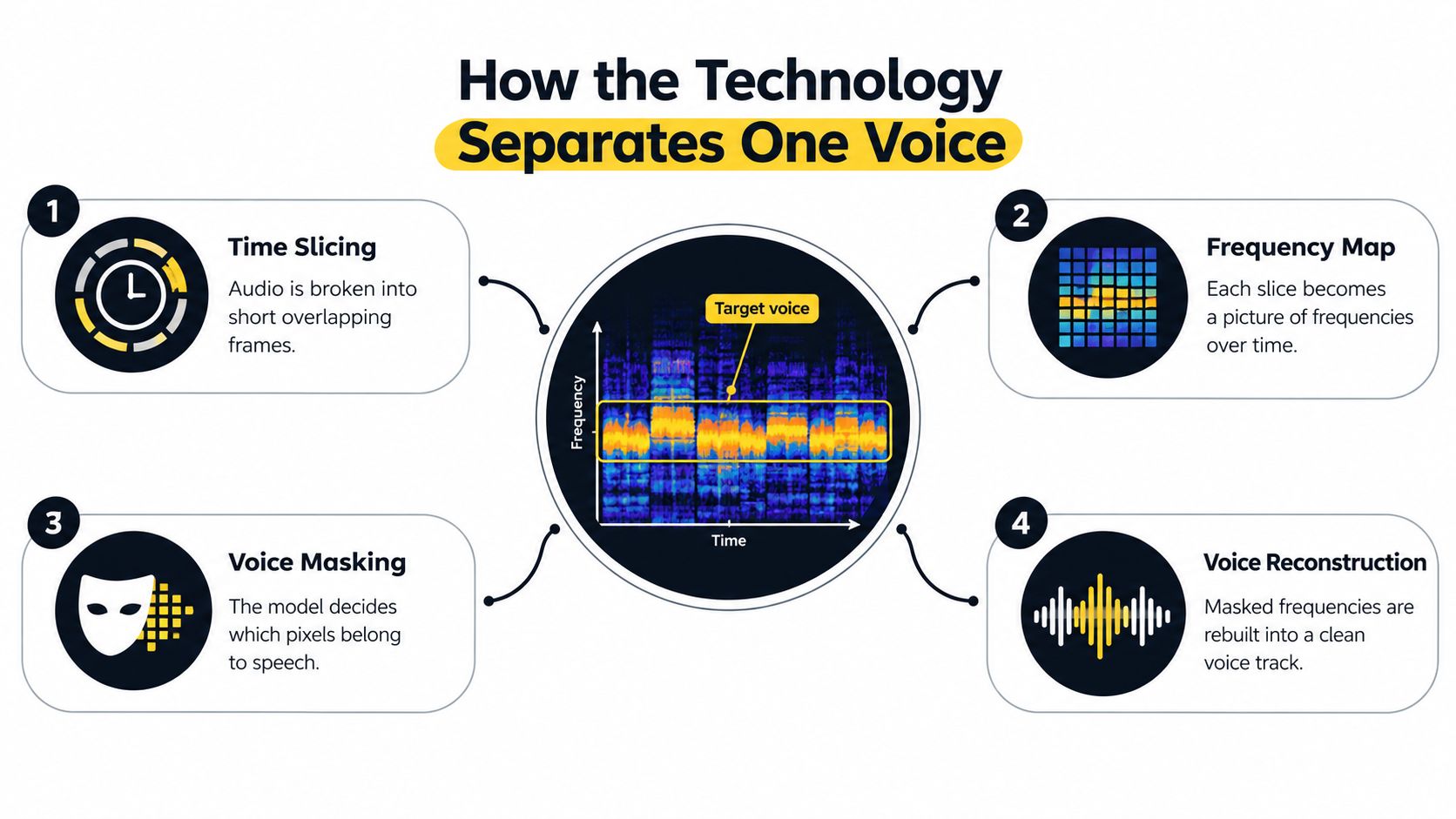
A recording can look chaotic as a waveform, where many sounds appear to occupy the same line. A spectrogram makes the mixture easier to reason about. It maps time along one direction, frequency along another, and energy through brightness or color. Voice isolation uses this time-frequency view to estimate which regions contain the target speaker.
The process usually follows four conceptual stages:
- Time slicing: The system breaks the audio into short, often overlapping frames. Each frame captures a small moment rather than the entire recording.
- Frequency mapping: It analyzes the frequencies present in each frame and arranges them into a spectrogram.
- Voice masking: It estimates which spectrogram bins belong to the desired voice. Some systems use rules and statistical assumptions, while learned models predict a soft mask that preserves more or less of each region.
- Reconstruction: It applies the mask to the mixture and converts the selected information back into a waveform that sounds like a voice track.
An academic explanation of this spectrogram masking approach describes the model as predicting which time-frequency bins belong to the desired speaker, applying the mask element by element, and reconstructing the result. The practical benefit is direct. Interfering sources are attenuated before speech recognition receives the signal, so an automatic transcription system has fewer competing patterns to interpret.
Rules, statistics, and learned patterns
Traditional methods such as spectral subtraction and Wiener filtering estimate signal and interference from measurable properties. Adaptive beamforming adds spatial information when multiple microphones are available. These approaches can be efficient, explainable, and suitable for real-time use, but they can struggle when the interference resembles speech or changes quickly.
Neural systems learn recurring structures from examples. Instead of being told only that a frequency is loud or quiet, the model can use speech patterns, timing, harmonic structure, and context to estimate what belongs to the target. It still can't recover information that was never captured, and it may invent a plausible texture when the evidence is ambiguous.
Live enhancement versus offline output
A call system normally produces one enhanced signal with minimal delay. It must make decisions quickly because a noticeable pause or unstable sound would disrupt conversation. That system may favor conservative processing, even if it leaves some background behind.
An offline tool has more freedom. It can analyze the whole file, revisit difficult passages, and create separate outputs for the isolated voice and the remainder. Those files can then enter a digital audio workstation for volume rides, fades, EQ, or replacement edits.
The distinction is useful when comparing products. Audio source separation explained for creators covers the broader category, while a live call feature is usually a focused speech-enhancement layer. Choose based on the output you need, not on whether both interfaces use the same label.
Where Creators Actually Use Voice Isolation
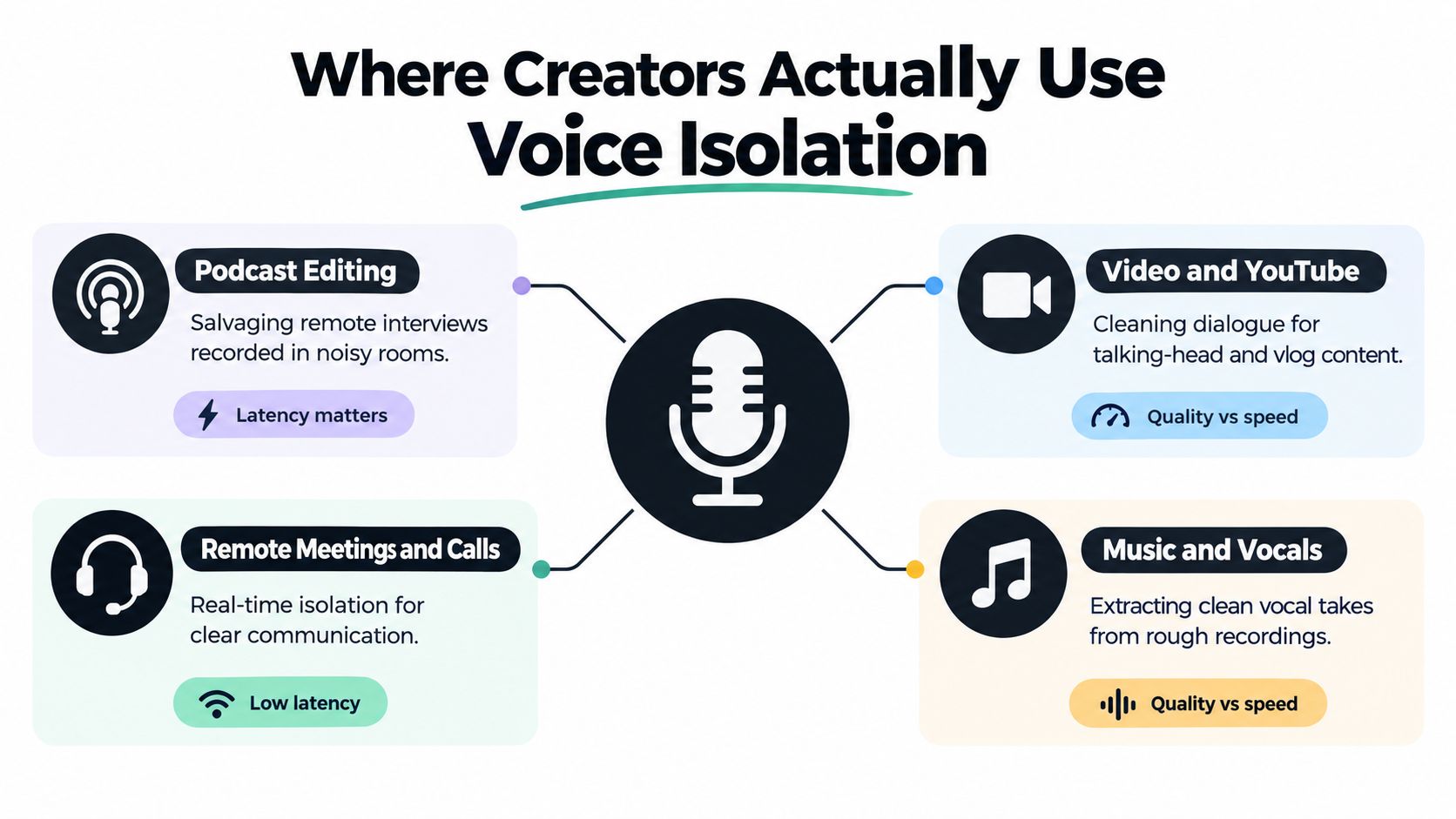
A remote interview provides a simple example. One guest records in a quiet room, while another speaks beside an open window and a noisy appliance. The editor doesn't necessarily need to rescue every sound in the file. They need the guest's words to remain intelligible, with enough natural tone to fit the conversation.
Podcast production often values speed, consistency, and speech clarity. An editor may isolate dialogue, place it over a new room tone, and adjust the level beneath music. If the tool creates a separate remainder track, the editor can decide whether to keep a small amount of ambience instead of accepting a completely dry, artificial result.
Film and video work introduces more layers. Production dialogue may share a take with traffic, HVAC rumble, handling noise, or music from a nearby location. A post-production editor can use separation as one stage in a larger process, then combine the cleaned dialogue with effects and background ambience. Isolation doesn't replace microphone placement or location sound, but it can give the editor another option when rerecording isn't practical.
Different rooms, different compromises
Music users may want to pull vocals from a reference track for practice, create a backing arrangement, or reduce vocal bleed in a rough mix. That job is closer to musical stem extraction than to cleaning a spoken interview. Harmonic instruments and singing can overlap heavily, so a result that sounds acceptable for practice may not be suitable for a commercial release.
A live broadcaster has a different priority. The host needs to stay understandable while the system reacts to keyboard taps, household activity, or a nearby conversation. The broadcaster may accept a little tonal coloration because a delayed or over-processed feed would be worse during a live show.
Researchers and accessibility teams can also use speech-focused enhancement on field recordings, archival material, or difficult listening environments. Their standards vary. A researcher may prefer a transparent result that preserves environmental context, while an accessibility workflow may prioritize the words above nearly everything else.
| Workflow | Main objective | Typical compromise |
|---|---|---|
| Podcast editing | Make dialogue usable in a finished episode | Some vocal coloration may be acceptable |
| Video post-production | Recover speech beneath location interference | Cleanup must still fit music and effects |
| Music practice | Extract or reduce a vocal or instrumental part | Artifacts may remain in dense mixes |
| Calls and broadcasts | Keep speech intelligible in real time | Low latency limits processing choices |
| Research and accessibility | Make speech easier to inspect or hear | Preserving context may matter as much as clarity |
Creators recording voice-over for social video also need a clean path from capture to publication. A practical resource on how to do voice over on Instagram can help with the wider workflow, while voice isolation addresses the audio conditions inside the recording.
The same algorithmic family can feel excellent in a call and disappointing in a song because the success criteria differ. A call needs understandable words now. A music producer may need a natural, phase-coherent part that survives close listening and further processing.
Voice Isolation Versus Stem Separation
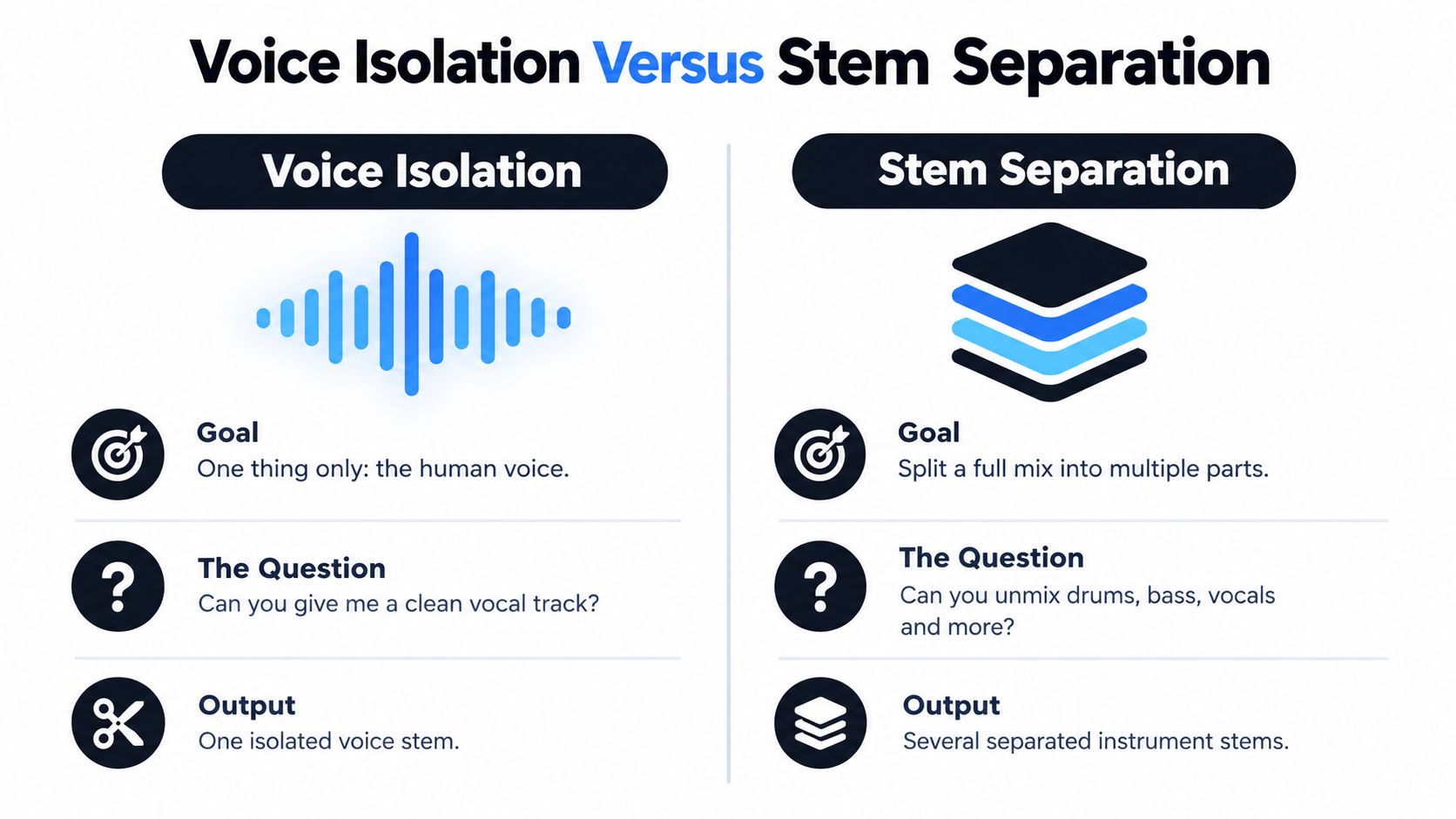
Voice isolation and stem separation overlap, but they aren't interchangeable. Voice isolation targets one selected speaker or vocal element. Its central question is whether the system can produce a cleaner voice track from a mixture.
Stem separation takes a broader view. It attempts to divide a finished mix into meaningful components such as vocals, drums, bass, and other instruments. A musician who wants to practice with a backing track is asking for several musical parts to be separated. A podcaster trying to rescue a guest's dialogue is asking for focused speech enhancement.
The output reveals the difference:
| Approach | Primary goal | Result |
|---|---|---|
| Voice isolation | Prioritize one human voice | One isolated voice output, often with a remainder |
| Stem separation | Unmix several parts of a full production | Multiple instrument or vocal stems |
| Call-level enhancement | Improve the microphone feed while speaking | One processed signal for immediate use |
The boundary can blur in real work. A creator may ask for “the voice” in a song, but singing, instruments, room reflections, and effects can make that request a musical separation task. A spoken interview with a second speaker may require target-speaker separation, especially when both people talk over one another.
There is another important distinction between enhancement and extraction. Enhancement tries to make the existing output more intelligible, often by suppressing interference while preserving a single signal path. Extraction creates an asset you can edit independently. If you want to lower the music under a sentence, replace a noisy section, or build a new mix, an isolated file is more useful than a call filter.
Voice isolation asks, “Can I hear this speaker clearly?” Stem separation asks, “Can I take this finished mix apart?”
The stem separation guide is useful when your goal involves multiple musical or audio layers. Choose that category when you need a set of parts. Choose speech-focused isolation when one speaker's intelligibility is the central outcome.
Where Voice Isolation Falls Short
Voice isolation works by making an informed estimate. It doesn't possess a perfect copy of the original speaker hidden underneath the mixture. When the recording doesn't provide enough distinguishing information, the system has to choose what to preserve and what to suppress.
Overlapping speech is the clearest stress test. Two people can occupy similar frequency ranges and speak at the same time, so the algorithm may favor the target while damaging the competing voice, or it may leave fragments of both. Those fragments can sound watery, phasey, or synthetic, especially during consonants and quick changes in pitch.
The benchmark evidence is encouraging but also revealing. In a 2026 evaluation of 265 real conversations, pooled word error rate across eleven speech-to-text configurations fell from 23.29% to 6.26%, a 73% reduction, after voice-isolation processing. The hardest overlapping-speech set improved from 31.84% to 6.30%, while a call-center set moved from 23.83% to 6.86%. These results show that separating a target voice can materially help machine recognition, not that every isolated file will sound natural to a human listener.
The difficult sounds
Music creates another boundary. A piano note, backing vocal, or guitar harmonic can occupy the same time and frequency region as a spoken syllable. If the system removes the shared region, it may damage the voice. If it keeps the region, music bleed remains. The resulting track may contain metallic resonances or a hollow tone.
Reverberation also complicates the estimate. Reflections spread speech across time, making the voice less distinct from the room. A model trained on relatively dry speech may produce a thin or phasey result when it encounters a hard, reflective space.
Aggressive processing can flatten performance. A speaker's changing volume carries emotion and emphasis, but an enhancement system may reduce those differences to keep quiet words audible. The result can be clearer while sounding less like the original person.
A separate evaluation using 1,685 real-world recordings reported an average WER reduction from 15.35% to 8.22%, or 46.4%, compared with unprocessed audio. The same body of benchmark evidence also indicates that cleaner recordings can experience slight degradation, so processing every file by default is a poor habit.
Listen to the isolated result before committing to it. If the original already works, preservation may be more valuable than extra separation.
Choosing the Right Voice Isolation Approach
Start with the delivery situation, not the product name. If you're speaking in a meeting, joining a live interview, or broadcasting in real time, you need enhancement with low delay. If you already have a recording and need a voice file you can edit, you need offline processing.
Use this checklist before choosing:
- Timing: Do you need the result during the conversation, or can you process the file afterward?
- Recording conditions: Is the main problem a steady fan, changing environmental noise, room reverb, music, or another speaker?
- Speaker behavior: Does one person speak alone, or do speakers regularly overlap?
- Output: Do you need a clearer single feed, an isolated voice, or several editable stems?
- Artifact tolerance: Is intelligibility enough, or must the voice retain natural dynamics and tone?
- Editing access: Can you review difficult sections and manually repair them after processing?
Match the tool to the job
Built-in call features such as Zoom Enhance, iOS Voice Isolation, and KrispTHDRIVE belong in the real-time category. They make sense when the priority is keeping a live conversation moving and reducing the burden on the listener. They aren't automatically the right choice for rebuilding a finished podcast, extracting dialogue from a music bed, or creating a stem for detailed post-production.
Dedicated offline AI separation tools suit a different workflow. Isolate Audio lets creators upload an audio or video file, describe the target sound in natural language, and receive an isolated element alongside the remainder. Its workflow supports voice-focused tasks as well as descriptions of other sounds, with quality presets and a Precision Mode for more difficult mixtures.
Manual editing remains a valid choice. If the source is already fairly clean, a careful editor may prefer clip gain, equalization, expansion, room-tone replacement, or a few targeted cuts. These methods take more attention, but they can preserve a speaker's character better than a broad automated pass.
A simple decision rule works well:
- Choose real-time enhancement for calls, live collaboration, and broadcasts.
- Choose offline AI separation when you need an editable voice or sound output from an existing file.
- Choose manual editing, or combine it with isolation, when the recording has emotional nuance, severe overlap, or high production value.
Run a short representative sample before processing a full project. Include the loudest background, the most difficult overlap, and a section where the speaker changes volume. Compare the processed result with the original at a comfortable listening level, then keep the version that serves the audience rather than the one that sounds most aggressively “clean.”
If you have a finished recording that needs a specific voice or sound separated, try Isolate Audio with a plain-language description of the element you want to extract. Review both the isolated track and the remainder, then use the result as a focused starting point for your podcast, video, music, or research workflow.